Photoroom Review: The Cutout Worked. Then the Widget Fell Apart
I tested Photoroom logged out, then signed in the same day on the free plan. The public widget cut a simple phone photo, then dead-ended. After email sign-in, Edit Cutout was free. Generative AI spun about 20 seconds and asked for Pro. Usage is a modal, not a page.
I tested Photoroom because I keep needing clean product cutouts, and I did not want to sign up first.
That is my bias from the start.
Most AI photo editors bury the actual work behind a funnel. I wanted to know if Photoroom would let me do one job without an account. If the public widget worked, great. If it shoved me into a login before a single export, I would say so.
On ToolifyNav, Photoroom is listed as a freemium Image Generation & Editing tool. Site: photoroom.com. Pricing on the listing: “Free tier / paid Pro subscription and API credits.” I treated that as a map, not as proof.
I ran two sessions on 2 September 2026. First I stayed logged out on the public background remover. Later the same day I signed in with email, still on the free plan, in the default personal space. That second session does not make this a full-product review. It is what I actually clicked.
Session 1: logged out on the public widget
I stayed logged out on the Photoroom background remover. No Google. No Facebook. No Apple. No email.
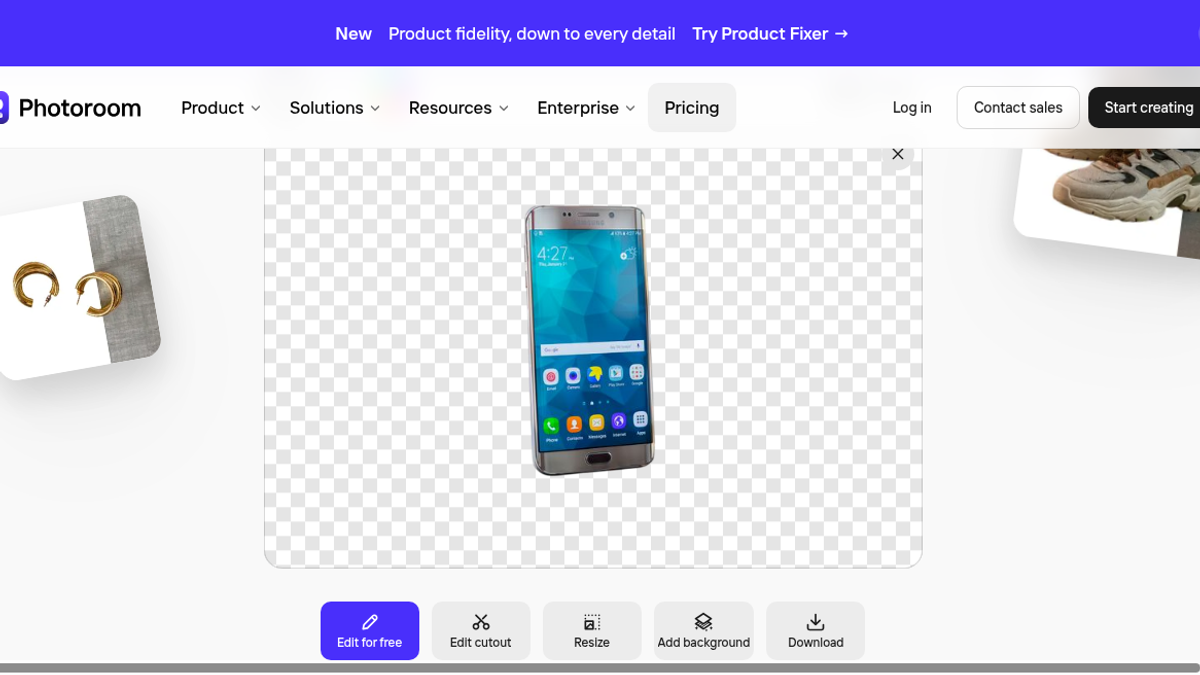
I uploaded a simple phone product photo. A silver Samsung on a desk. Nothing fancy. No jewelry. No busy flat-lay. Just one product.
The widget processed it in about 5 to 10 seconds.
I got a clean transparent cutout. Edges looked tight around the phone against the checkerboard. No watermark on that result. No login prompt. No credit counter in that widget.
Download worked in the browser.
That part is good.
I will not dress it up. I could not inspect the downloaded file on disk. So I will not claim export resolution, file format, or alpha quality at 100% zoom. I saw a clean cutout on screen, and the browser let me download it. That is all I can stand behind.
After download, I tried the obvious next step. A cutout without a new background is only half the job I came for.
Background swatches did nothing.
Before-After did nothing.
Add background did nothing.
I clicked them. The widget did not change the result. From a logged-out session on 2 September 2026, those controls did not work. I would have accepted a paywall. I got dead buttons instead. That is worse than a paywall. A paywall is at least a sentence.
I also tried the sample thumbnails sitting next to my result. They failed.
The error was blunt: “Oh no, something went wrong! Please try again later.”
Then I uploaded a more complex flat-lay. Same error. Same dead end.
So the one logged-out success I had was a simple product shot I chose myself. The samples and the harder image did not go through. That is a bad ratio for a public demo.
Session 2: email sign-in, same day
The full app at app.photoroom.com/create is behind signup. Google, Facebook, Apple, or email.
Later that same day I used email sign-in. Photoroom does not set an account password for email. It is a passwordless magic code or link. I landed in a free personal space. I did not start a trial. I did not enter a card.
Batch, Brand Kit, Virtual Model, and the API were visible in the sidebar. I did not open them. I am not going to review them.
Cutouts are free once you are inside
I uploaded a product photo in the logged-in editor. The background came off automatically.
Edit Cutout was there. Erase and Restore were there. Guided versus Manual was there. Cutout Suggestions were there. All of that ran on the free space. No upgrade prompt on those controls.
That is the job the public widget only half-finished. Signing in did not make the cutout smarter. It made the editor usable.
Generative AI waited, then asked for Pro
I tried a generative AI background. I used “Describe an edit.” Generate spun for about 20 seconds. Then the UI said “Upgrade to Pro to unlock this feature.”
No output. No image. The paywall hit after the wait, not before.
That is a worse pattern than a locked button. I sat through the spinner as if work was happening. It was not. If a feature is Pro-only, say so before I wait.
Usage is a modal, not a page
I looked for usage. Photoroom’s /usage URL 404s. Usage is a modal.
The modal showed AI credits 0% used. Exports 0/100 used. It renews October 2. The same modal said “Get Pro to unlock more.” Upgrade Space to Pro banners sat on the screen and did not go away.
I had used none of those credits yet. The pitch was still there. So the free space is a cutout editor with a 100-export cap and a persistent upgrade banner. It is not a quiet studio.
Pricing as shown on the site
I read photoroom.com/pricing in USD. I did not start a trial. I did not enter a card.
Yearly, billed monthly: Pro $7.50 (was $12.99), Max $20.99 (was $34.99, marked most popular), Ultra $82.50 (was $99).
Monthly: $12.99 / $34.99 / $99.
Pro listed 8000 AI credits and 1000 exports. The CTAs said “Start free trial.” I am not repeating vendor sales-uplift stats as if I verified them. Marketing numbers are not test results.
The only usage counter I actually saw was that free-space modal: 0% AI credits, 0/100 exports, renews October 2.
Who this is for, based on what I saw
If you have a simple product photo and you only need a transparent cutout, both the public widget and the free logged-in editor did that job. Fast. Clean on screen. After sign-in, Edit Cutout with Erase, Restore, Guided, Manual, and Cutout Suggestions ran without a paywall.
If you need new backgrounds from the same logged-out screen, I cannot recommend it. The controls sat there and did nothing.
If you need generative AI backgrounds or “Describe an edit” on the free space, I also cannot help you. Generate spun for about 20 seconds, then asked me to upgrade. No output.
Do not treat this as a review of Batch, Brand Kit, Virtual Model, or the API. Those items were in the sidebar. I did not use them.
Verdict
Photoroom can cut a simple phone product photo in a few seconds, logged out or logged in. That is the honest win.
The logged-out widget then failed me. Background tools did nothing. Samples and a complex flat-lay threw “Oh no, something went wrong!” The full app asked for an account.
After email sign-in, the free editor did the cutout work the widget would not. Generative AI still did not. It waited, then paywalled. Usage lives in a modal, not at /usage, and the free space already pitches Pro at 0% used.
I like tools that finish the job they start. This one starts the cutout. It does not finish a generated background on the free path I used.
Final rating: 3 out of 5.
The cutout worked. A 20-second spinner that ends in “Upgrade to Pro” is not a higher score. Signing in did not earn Pro features I still did not get.
ToolifyNav Directory
Explore Photoroom on ToolifyNav
Photoroom is an AI photo editing and background generation studio built for ecommerce merchants, product photography, and high-volume image workflows.