Evoto
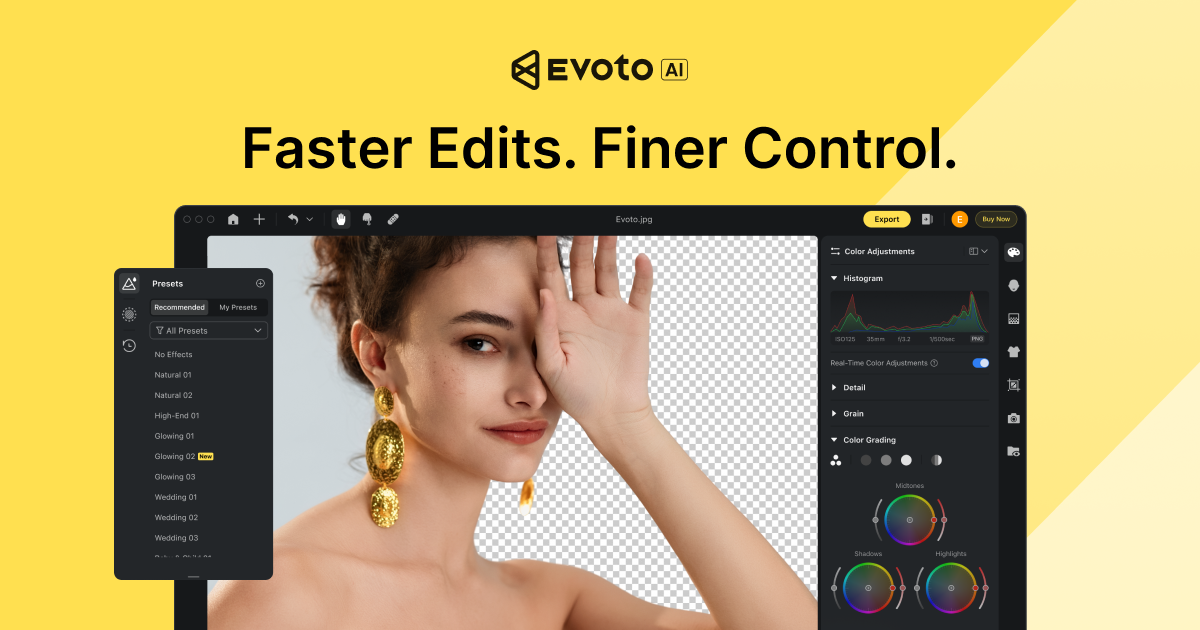
AI photo-editing suite for professional photographers covering culling, portrait retouching, color grading and batch delivery.
Evaluation
What to know
Editorial notes based on the vendor's own documentation and public pricing, plus hands-on testing where a score or review is shown above. They describe fit for a job, not absolute quality.
Best for
- Wedding and event photographers delivering hundreds of images
- Headshot studios needing consistent retouching at scale
- Portrait photographers replacing outsourced retouchers
Not ideal for
- Hobbyists editing a handful of photos a month
- Landscape, architecture or product photographers
- Editors who want fully manual, non-AI control in Photoshop
Key features
- AI culling that flags blur, closed eyes and duplicates
- Portrait retouching for skin, hair, reshaping and glasses glare
- Consistent color grading and batch processing across sessions
- Desktop, iPad, mobile, browser and video retouching apps
- Gallery sharing and Asset Hub backgrounds for delivery
Pros
- Saves hours on high-volume portrait and wedding retouching
- Skin retouching keeps texture better than blunt smoothing filters
- Covers culling to delivery in one subscription
Cons
- Per-photo credit model makes costs scale with shoot volume
- Mainly portrait-focused; landscape or product editors get less value
- Annual commitment needed for the best per-credit price
ToolifyNav verdict
Evoto is aimed squarely at photographers whose bottleneck is the volume of people pictures between shoot and delivery. Its strengths are retouching that respects skin texture, reliable batch consistency and a workflow that runs from culling to client galleries. The credit model is the key consideration: costs scale with exports, so studios should estimate annual volume before choosing a tier. For portrait, wedding and headshot businesses it can replace a lot of manual retouching; photographers in other genres or with low volume will get less from it.
About
About Evoto
Evoto is an AI-powered editing platform built for working portrait, wedding, event and headshot photographers. Its pitch is an end-to-end workflow: tether during the shoot, cull the strongest frames, retouch and color-grade, then deliver through gallery sharing. The desktop app does the heavy lifting, with companion iPad, mobile and browser versions plus Evoto Instant for fast on-site turnaround and Evoto Video for portrait retouching on footage.
Retouching tools focus on people: skin smoothing that preserves texture, blemish and flyaway-hair removal, face and body reshaping, teeth whitening, glasses-glare removal and background cleanup. AI culling ranks frames by sharpness, closed eyes and duplicates. Color tools keep grading consistent across a whole wedding day, and batch processing applies presets and adjustments to large sets. An Asset Hub offers AI scenes, backgrounds and seasonal presets for mini-sessions.
Evoto bills by credits for exported photos, with some features labeled credit-free. Subscriptions bundle annual credit pools at falling per-credit prices, pay-as-you-go packs exist, and new users get a seven-day trial with 50 free credits. Volume pricing is available for studios.
Related
More in Image Generation & Editing
Same category — not a curated competitor list.

Discover More
Weekly digest
Get weekly AI tools and hands-on reviews
A short digest of new tools and hands-on breakdowns. Unsubscribe anytime.