Fotor
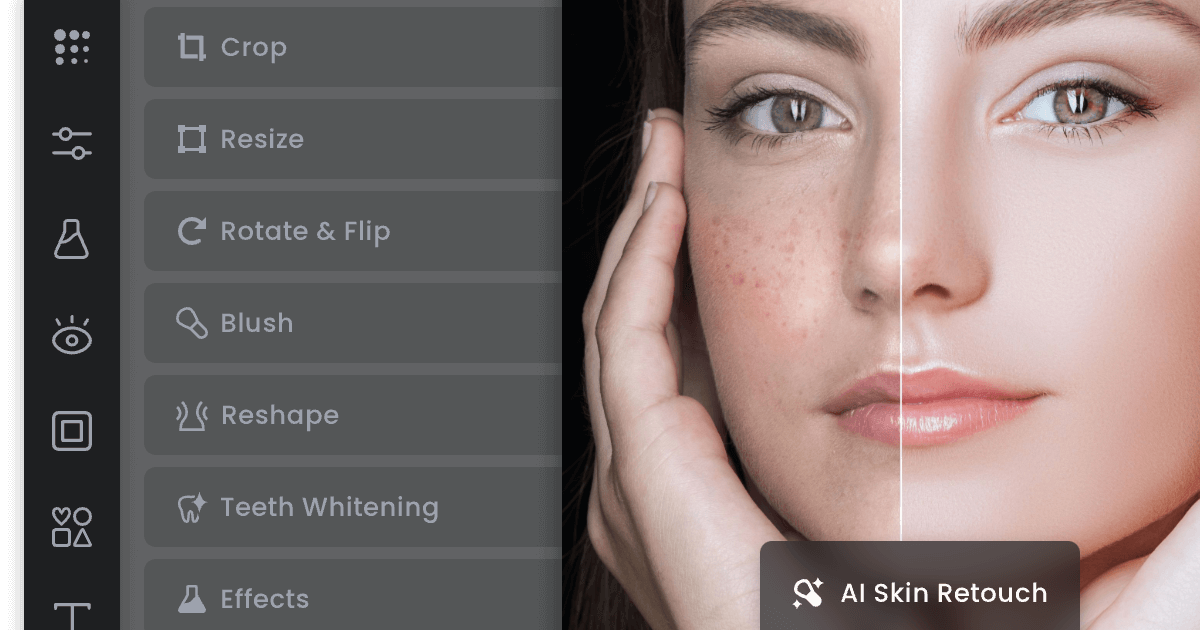
Long-running online photo editor and design tool that layers AI enhancement, background removal, object removal, headshots and image generation onto a free browser editor.
Evaluation
What to know
Best for
- Casual users fixing family photos and old scans
- Small businesses making social graphics and product shots
- Job seekers wanting quick AI headshots
Not ideal for
- Professional photographers editing RAW files
- Designers needing layered vector work
- Heavy AI-video creators who need large credit volumes
Key features
- One-click enhance, unblur, upscale and old-photo restoration
- Background, object, person, text and watermark removal
- Text-to-image, AI headshots, image extender and image-to-video
- Photo-to-anime, cartoon, sketch and watercolor style effects
- Templates for social graphics and flyers
Pros
- Very low annual pricing compared with most AI editors
- Browser-based, so nothing to install for quick fixes
- Covers both retouching and simple graphic design in one place
Cons
- Pricing page mixes subscriptions and credit packs in a confusing way
- Free exports and AI use are limited
- Advanced generation depends on credits that run out quickly on video
ToolifyNav verdict
On a tight budget, Fotor is the generalist to beat. It does not lead on any single model, but it collects the edits ordinary users actually need — restoration, background removal, headshots, quick generation — behind a browser tab and an annual price lower than many tools charge per month. That makes it a sensible default for households and very small businesses. The limits show at the edges: credit-heavy video, professional retouching and anything requiring layers or RAW support. Readers who want one inexpensive tool for everyday photo jobs will be well served; specialists should keep their dedicated software.
About
About Fotor
Fotor has been around since 2012, built by Chengdu-based Everimaging, and it remains one of the most-visited browser photo editors for people who will never open Photoshop. Its homepage reads like a menu of quick fixes: enhance image quality, unblur, sharpen, upscale up to 4x, restore and colorize old photos, retouch portraits, correct color, resize and crop.
The AI layer has grown around that core. Background tools remove or replace backgrounds and make transparent PNGs; removal tools erase objects, people, text and watermarks; and an image text editor and translator can change words inside a picture. Style effects turn photos into anime, cartoons, sketches, watercolors or line drawings. Generative tools include a text-to-image generator with several underlying models, an AI headshot generator, an image extender for uncropping, an avatar maker, outfit and hairstyle changers, and image-to-video. Fotor also offers design templates for social posts, flyers and marketing graphics, and apps for desktop and mobile.
The free Basic plan stays usable for simple edits, with limited AI credits. Paid tiers add more monthly credits — Fotor translates them into rough counts of Nano Banana Pro images or Seedance videos — plus watermark-free output, batch tools and storage. Separate credit packs are available for heavier generation.
Related
More in Image Generation & Editing
Same category — not a curated competitor list.
Discover More
Weekly digest
Get weekly AI tools and hands-on reviews
A short digest of new tools and hands-on breakdowns. Unsubscribe anytime.