Hemingway Editor
Color-coded readability editor that flags long sentences, weak words and passive voice, with optional AI rewrites in Editor Plus.
Evaluation
What to know
Best for
- Bloggers, marketers and newsletter writers aiming for plain language
- Students learning to tighten their writing
- Teams standardizing on a readability target
Not ideal for
- Fiction writers wanting stylistic voice feedback
- Academic papers needing citation and formal-register tools
- Writers who need long-form AI drafting
Key features
- Color-coded highlights for hard sentences, complex words, adverbs and passive voice
- Readability grade level and target reading level setting
- Editor Plus one-click AI rewrites and tone/length/style adjustments
- Advanced grammar checking with unlimited fixes
- Free web editor, Classic desktop app, Team and Enterprise plans
Pros
- Free core editor remains genuinely useful
- Readability-first approach produces punchier, clearer copy
- Low-cost Plus plan with a no-card trial
Cons
- Rules can push prose toward choppy sameness if followed blindly
- AI rewrites capped at 5,000 or 10,000 sentences a month
- Less suited to academic or technical precision writing
ToolifyNav verdict
Hemingway Editor remains a rare writing tool with a clear opinion: shorter, simpler sentences are better for most readers. The free color-coded editor still teaches that lesson faster than any style guide, and Editor Plus adds AI rewrites and real grammar checking for a modest annual fee. Its limits come from the same opinion. Followed mechanically, the highlights flatten voice, and academic or technical writing often needs nuance a grade-level score cannot see. Web writers and marketers get the most value; long-form authors should treat its suggestions as prompts to reconsider rather than orders.
About
About Hemingway Editor
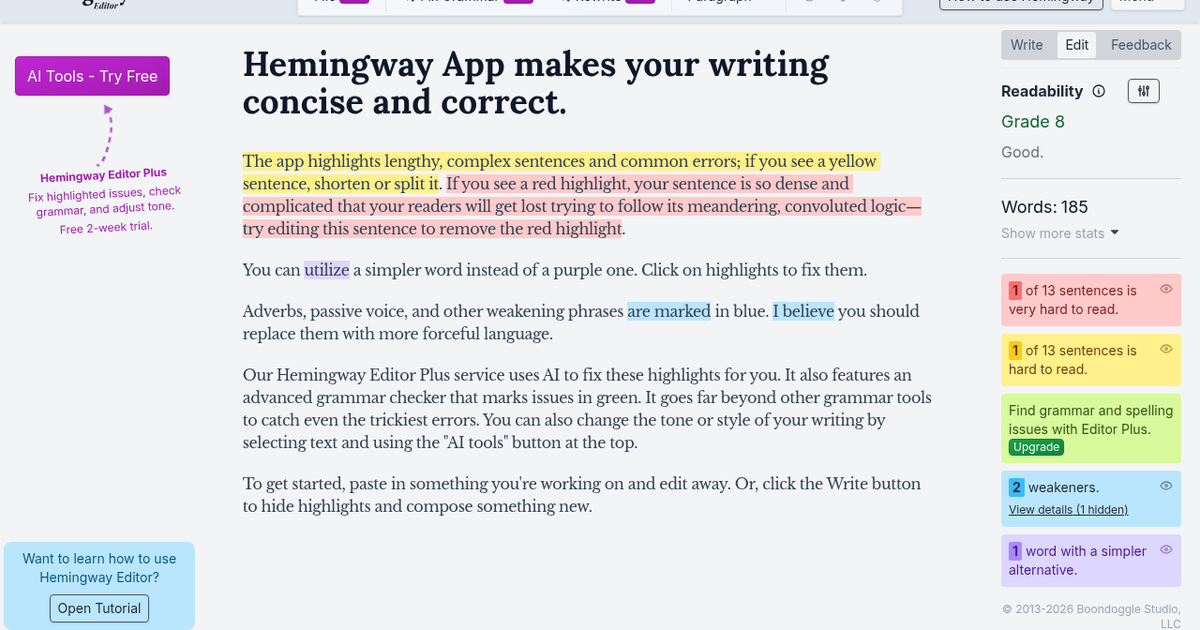
Hemingway Editor, from Boondoggle Studio, has been a fixture for writers who want plainer prose since 2013. The free web app still works the way people remember: paste text and the editor color-codes problems. Yellow marks long, complex sentences; red marks sentences so dense readers will get lost; purple flags words with simpler alternatives; blue highlights adverbs, passive voice and weakening phrases. A sidebar scores readability as a US grade level and counts words and hard-to-read sentences, and a Write mode hides highlights so you can draft without distraction.
Hemingway Editor Plus adds AI on top of that rule-based system. One click rewrites highlighted sentences to be shorter or clearer, an advanced grammar checker marks issues in green, and selecting text opens AI tools to adjust tone, length or style. You can set a target reading level, get document-level feedback, request synonym suggestions, import and export files and control dark mode. AI rewrites are capped by monthly sentence allowances, while grammar fixes and feedback are unlimited.
The Classic desktop app remains available, and Hemingway also offers free online tools for grammar checking, paraphrasing, proofreading and readability scoring. Plus plans start with a two-week free trial with no credit card, and Team and Enterprise tiers add shared billing, admin roles, more AI sentences and single sign-on.
Related
More in Writing & Editing
Same category — not a curated competitor list.


Discover More
Weekly digest
Get weekly AI tools + hands-on reviews
A short digest of new tools and hands-on breakdowns — unsubscribe anytime.