Powerdrill Review (4/5): Every Number Right, Until I Changed One
I gave Powerdrill a 40-row sales CSV and seven questions. It got every number right and showed the code it ran. Then I corrected one order, and the next answer quietly used the old data. Final rating: 4 out of 5.
Powerdrill got every number right on a small, messy sales file, and showed me the code it ran to get them. Then I corrected one order and the next answer quietly used the old data. That's the whole review in two sentences: four stars, with one asterisk you should know about before you trust it with edits.
The file was a made-up 40-row CSV of camera-accessory orders (order ID, date, product, country, quantity, unit price, revenue) across July to September 2026. I kept the correct answers for that file in a separate document before I opened the Powerdrill listing, so every row below is graded against those, not against my impression of the replies.
Getting in
"Start for free" asked for an email and nothing else. No password, no Google button needed, no card. A six-digit code arrived in about 20 seconds, in the Junk folder of my Hotmail address, from hello@powerdrill.ai. After that there was no onboarding quiz at all. It dropped me straight into a "Default Workspace" with a crown icon and 1,000 next to it, which is the daily credit counter. A "Super Sale Week" banner sat across the top. I ignored it and uploaded the file through the paperclip menu. It showed up as a 1.68 KB chip above the prompt box.
One thing to know before you sign up: the product is now called Powerdrill Bloom, and it is not a spreadsheet. There's a "Spreadsheets & Data" shortcut on the start screen, so I half expected a grid. What you actually get is a chat window with a hidden Linux sandbox behind it. The agent writes awk or Python, runs it against your file, and talks back.
The scorecard
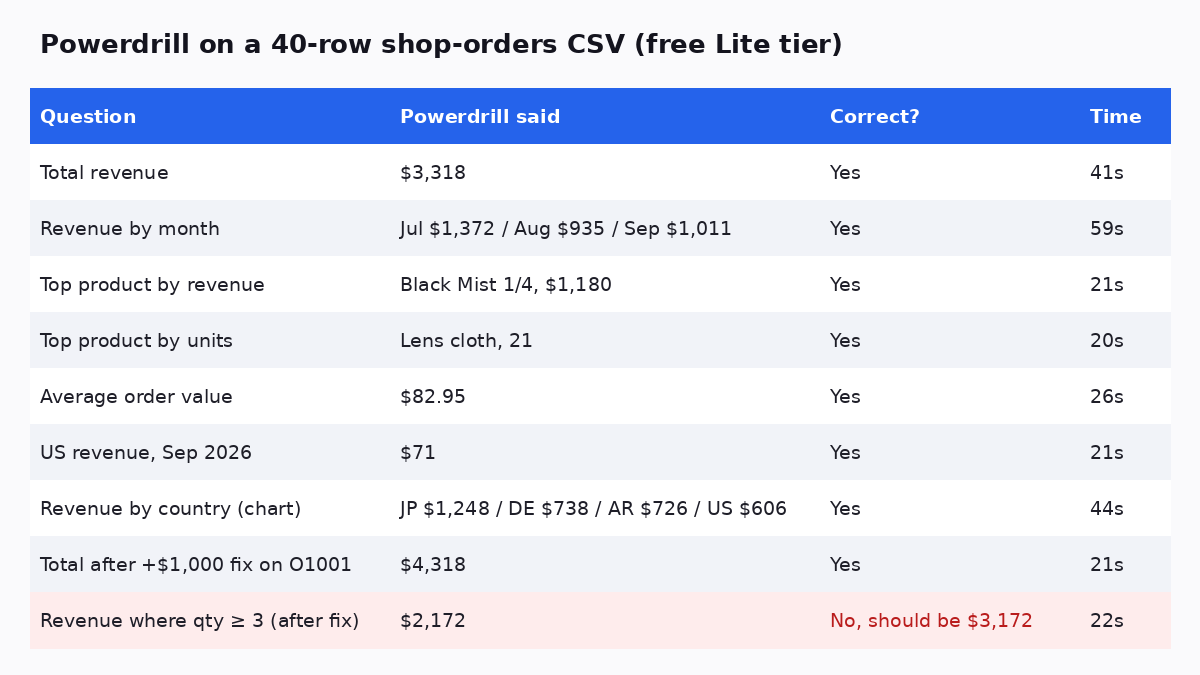
Nine questions in a row, all on the default Lite model. The first seven are a clean sweep. Not "close enough", exact. The eighth is right too. The last row is the asterisk.
Short takes, row by row
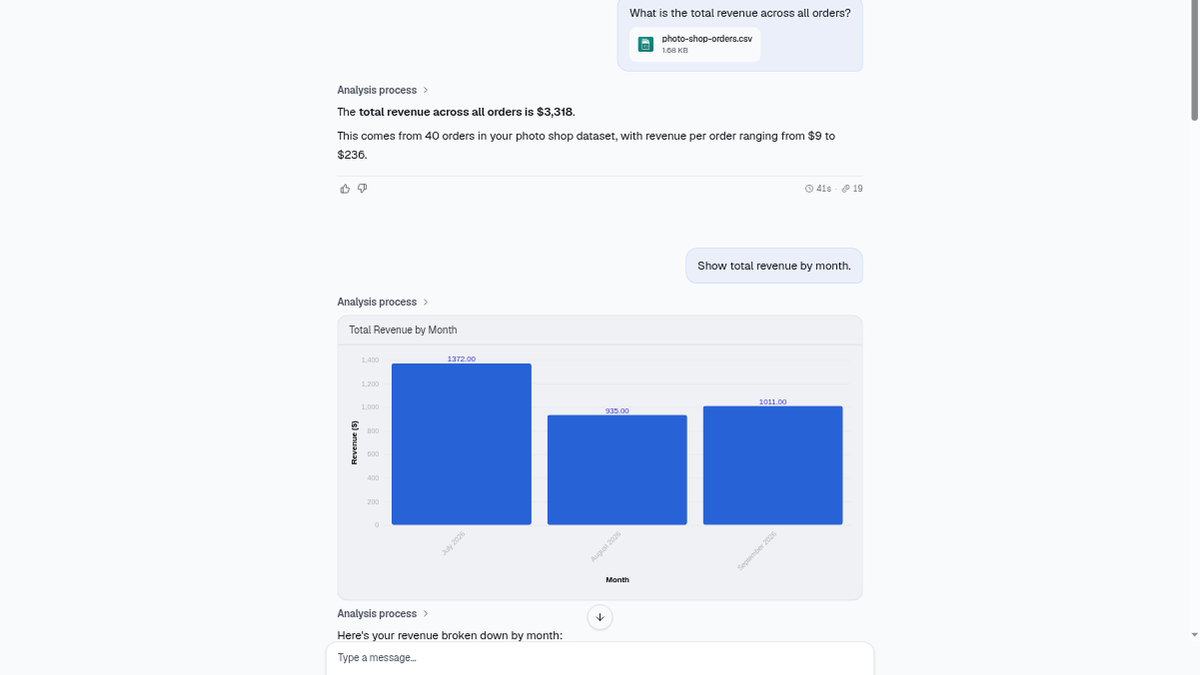
Total revenue, $3,318. Right, and it threw in the per-order range ($9 to $236) without being asked. 41 seconds, which felt slow for a sum, until I opened the "Analysis process" drawer and saw why. It first tried to pipe the column into bc, got bc: command not found (exit code 127), and rewrote the line in awk without any fuss. I liked seeing that more than I expected. The answer wasn't a guess from a language model. It came from a script I could read.
By month. Right on all three, July $1,372, August $935, September $1,011. It also drew an interactive bar chart with hover values and saved it as a downloadable HTML file. Slowest answer of the session at 59 seconds.
Top product by revenue / by units. Black Mist 1/4 at $1,180, Lens cloth at 21 units. Both right, and it pointed out the cheap lens cloth tops volume but comes last in revenue. A fair observation, not a profound one.
Average order value, $82.95. Right. 3,318 over 40.
US revenue in September, $71. This was my trap question, two filters at once, and the kind of thing chat tools often fumble by summing the whole month. The drawer showed a single awk line matching 2026-09 and US and printing 71. It added that the US was about 7% of September. True.
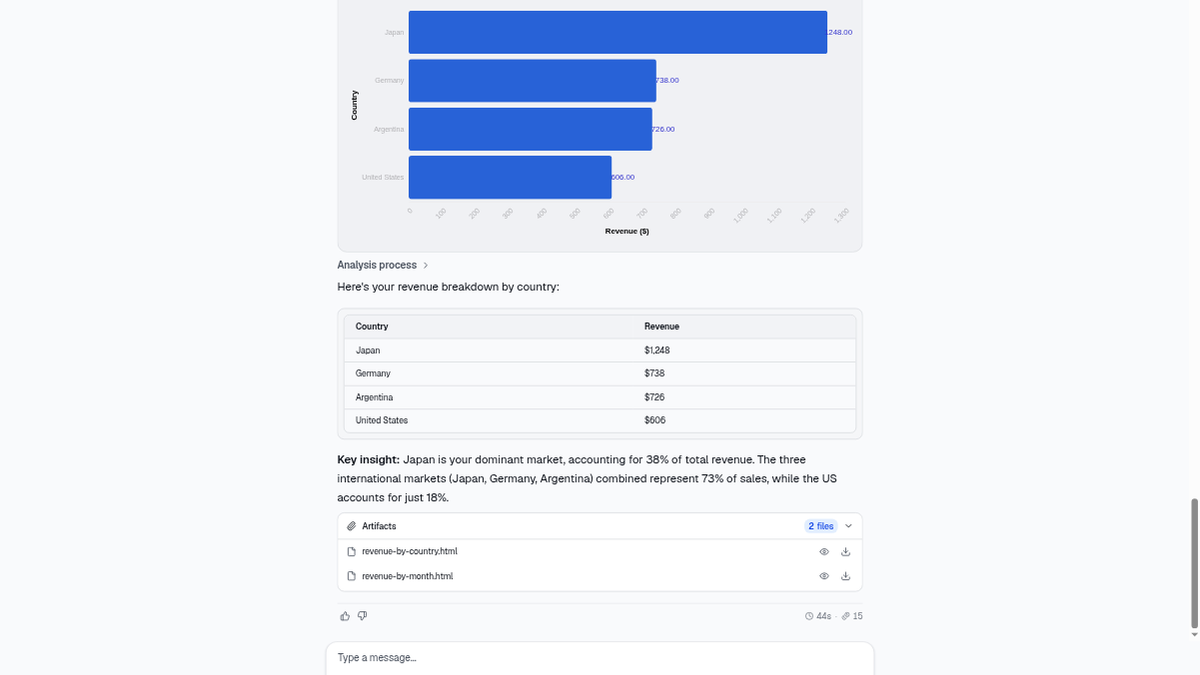
Revenue by country chart. Japan, Germany, Argentina, United States, all four bars matched my numbers. It expanded my country codes into full names on its own.
The part where I tried to change a number
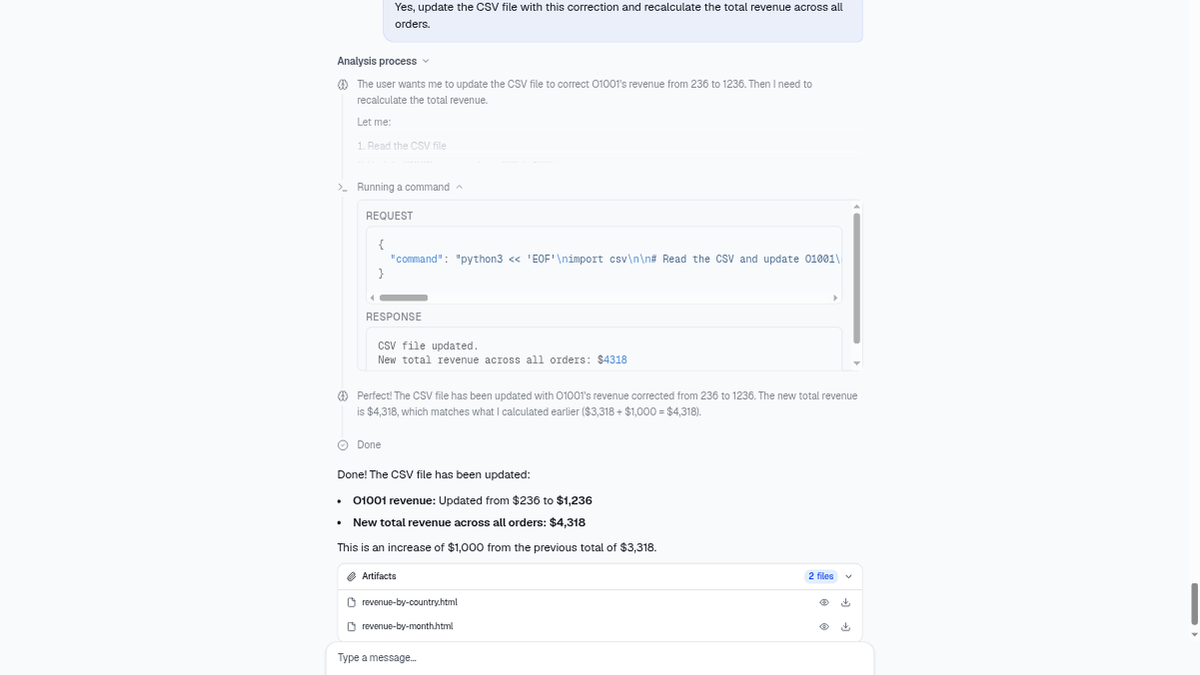
I told it order O1001 was wrong and should be $1,000 higher. The first reply did the arithmetic in text ($4,318 total, $2,372 for July), which was correct. It then asked whether I wanted the CSV itself updated. I said yes. It wrote a short Python script that opened the uploaded file, set O1001's revenue to 1236, and wrote it back. It printed "CSV file updated" and a new total of $4,318.
Fine so far. Then I asked for a snippet that totals revenue where quantity is 3 or more, and to run it. It wrote clean code, ran it, and reported $2,172 across 20 orders, "about 65% of your total $3,318 revenue."
O1001 has a quantity of 4. If that edit had held, the answer should have been $3,172, out of a $4,318 total. $2,172 is exactly what the untouched file gives. So between one turn and the next, my correction was gone. Either the edit never persisted into the next run, or it read a fresh copy of the upload. I can't tell which from the outside, and Powerdrill didn't notice anything either. It simply reported the old total as if nothing had happened two messages earlier.
That's the problem with a chat-only data tool. In a spreadsheet you'd see the cell. Here, you only find out if you already know the answer.
What it costs
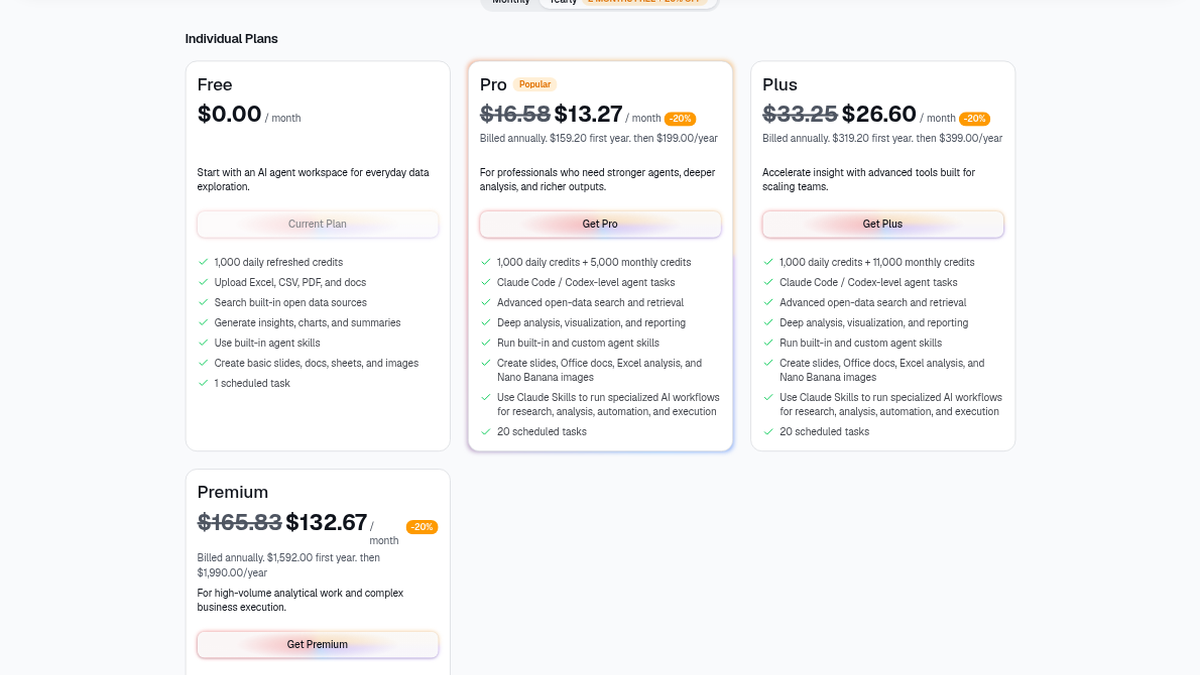
Nine questions, several charts, a file rewrite, and the counter still read 1,000 at the end. Lite didn't touch the credits at all, at least for me. The free plan advertises 1,000 daily refreshed credits, Excel/CSV/PDF uploads, charts and summaries, and one scheduled task. Pro is $16.58 a month, or $13.27 billed yearly ($159.20 the first year, then $199). Plus is $33.25 a month, and Premium jumps to $165.83. There's also a one-off $5 pack for 1,000 extra credits.
Who should bother
If you have a CSV and a few questions, and you're the kind of person who'll open the drawer and glance at the awk line, Powerdrill is quick, free, and honest about its working. I'd point a shop owner or a marketer at it before I'd point them at a pivot table tutorial. If you need to edit data and keep asking questions of the edited version, I wouldn't trust it without re-uploading the corrected file yourself. And if you wanted a real grid with formulas, this isn't that product, whatever the start-screen shortcut suggests.
I didn't try Excel or PDF files, the paid Claude-Code-level agent tier, scheduled tasks, or the open-data search. All of my testing was on one small CSV in one evening.
Final rating: 4 out of 5.
ToolifyNav Directory
Explore Powerdrill on ToolifyNav
AI data analysis workspace for chatting with CSV/Excel/databases, building datasets, charts and shareable analytical apps without heavy SQL.
Keep Reading
Related posts
SaaS Reviews
Paperguide vs Consensus: Cited Answers, Two Different Jobs
Paperguide wrote a cited daguerreotype answer I could open paper by paper. Consensus answered a fasting question with a meter across twenty studies. Both scored 4/5 for different jobs inside cited research.
SaaS Reviews
Paperguide Review (4/5): Cited Answers That Survive a Trap
I asked Paperguide when the daguerreotype was announced and got a Paris-1839 answer with citations I could open. Then I tried to trick it into inventing an 1835 London patent. It refused. Final rating: 4 out of 5.
SaaS Reviews
Jenni vs Paperpal: One Writes the Paragraph, the Other Fixes Yours
Jenni wrote me a cited paragraph on the daguerreotype and three of its four sources held up. Paperpal caught all seven slips I seeded in my own paragraph. Same $12 entry price, opposite jobs, and two free meters that run out differently.