Dzine
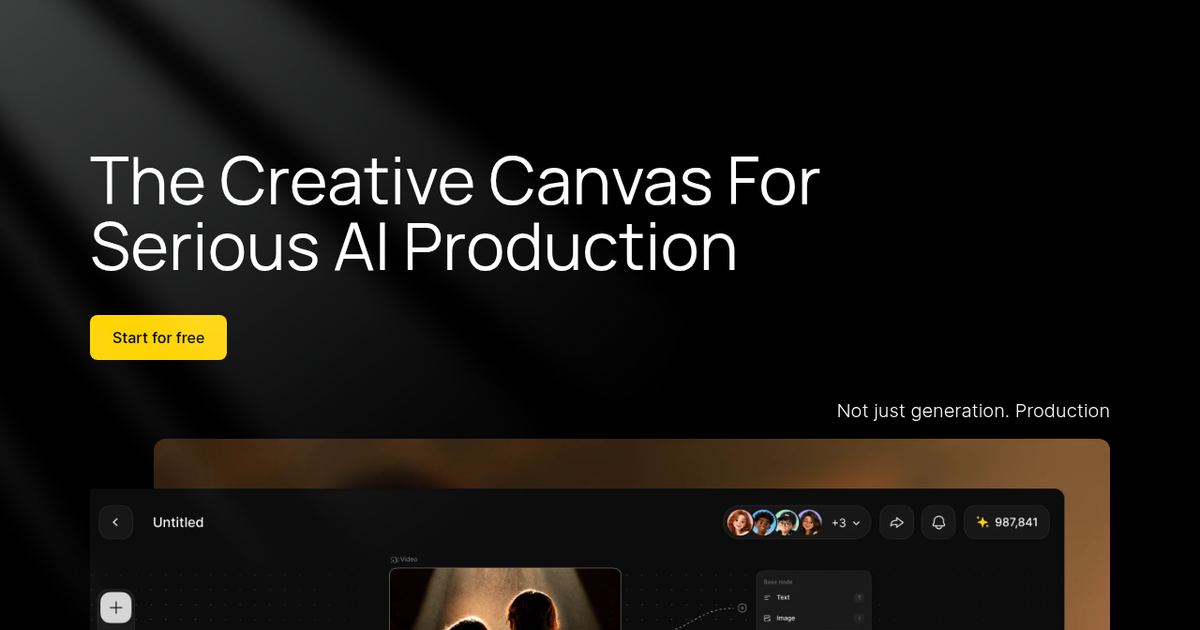
Browser-based creative canvas that strings image, video, lip-sync and audio generation together on one node board, with third-party models such as Nano Banana Pro, Kling and Veo built in.
Evaluation
What to know
Best for
- Indie filmmakers and animators assembling short AI-driven pieces
- Social video creators who need lip-synced characters
- Small studios wanting one board for storyboard-to-clip work
Not ideal for
- Illustrators looking for a pure painting or drawing tool
- Teams that must keep work private without paying
- Anyone who only needs a single text-to-image model
Key features
- Node-based canvas linking image, video and audio generation steps
- Script analysis that splits a treatment into scenes
- Multi-character lip-sync, talking avatars and dialogue generation
- Access to third-party models including Nano Banana Pro, Kling, Veo and Seedream
- Chain-of-title log and similarity checks for likeness or trademark risk
Pros
- One credit balance covers many outside image and video models
- Character and style storage keeps recurring faces consistent between shots
- Team canvas and shared library suit small studios working on one project
Cons
- Free generations are public and non-commercial
- Credit costs differ sharply by model, so monthly budgets are hard to predict
- The sheer number of filters and tools makes the interface busy for newcomers
ToolifyNav verdict
Dzine makes most sense for people who think in scenes rather than single images. Its value is consolidation: storyboard nodes, a rotating cast of third-party generators, lip-sync and a rights log live behind one login and one credit meter. That breadth is also the catch. Much of the raw generation quality belongs to the models Dzine licenses, so the reasons to stay are the canvas, character persistence and team features rather than any unique engine. Solo artists who just want pretty pictures will find it heavy; small teams producing narrative clips on a deadline get the most from it.
About
About Dzine
Dzine (the product that started life as Stylar.ai) has drifted a long way from its origins as a layer-based AI image editor. The current pitch is a production canvas: you drop image, video and audio nodes onto a shared board, feed them a script, and chain the outputs into short films, ads or social clips. A script-analysis step breaks a written treatment into structured scenes, and an asset library keeps characters, styles and references reusable across a project.
Underneath, Dzine is largely an aggregator. The model menu lists third-party engines — Nano Banana Pro, Seedream, Kling, Hailuo, Wan, Veo, Sora and others — alongside Dzine's own tools for consistent characters, 2D-to-3D conversion, generative fill, background and watermark removal, video upscaling and a long list of style filters (anime, Pixar-like, Ghibli-like, VTuber). Lip-sync is a major focus, with multi-character dialogue, talking avatars and a podcast generator.
The company is also leaning into rights management for teams. A "chain of title" record logs prompts, references, model choices, edits and approvals, and a copyright check flags likeness or trademark similarity before something ships. Team plans add multi-person canvas editing, a shared asset library and pooled credits. Dzine claims more than five million creators.
Related
More in Art & Creative Design
Same category — not a curated competitor list.
Discover More
Weekly digest
Get weekly AI tools and hands-on reviews
A short digest of new tools and hands-on breakdowns. Unsubscribe anytime.