Rows
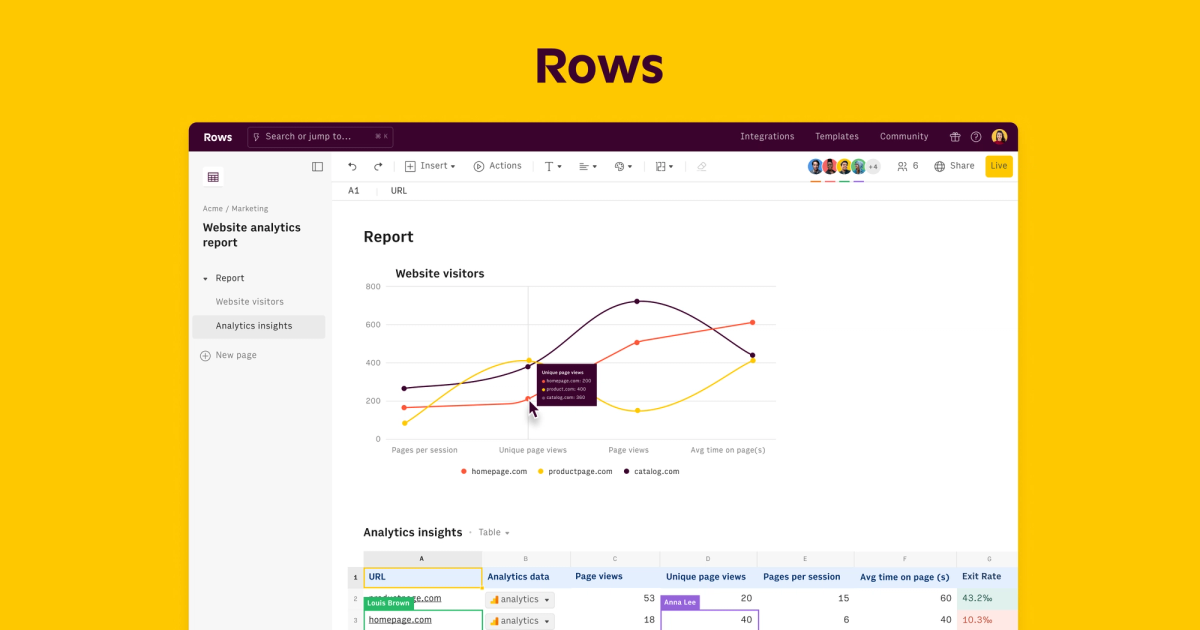
AI spreadsheet that merges formulas, integrations and assistants so teams build reports, automations and analyses without leaving the grid.
Evaluation
What to know
Editorial notes based on the vendor's own documentation and public pricing, plus hands-on testing where a score or review is shown above. They describe fit for a job, not absolute quality.
Best for
- Marketers and operators building recurring KPI sheets
- Teams that want AI help without leaving tabular workflows
- Analysts prototyping reports before a full BI project
Not ideal for
- Finance teams locked into Excel/VBA macro estates
- Users who only need a static personal budget sheet
- Enterprises requiring on-prem spreadsheet servers
Key features
- AI assistants that write formulas, summaries and report layouts
- Native integrations to ads, finance and SaaS data sources
- Automations and scheduled refreshes inside the spreadsheet
- Shareable views and reports for stakeholders
- Free, Plus and Business seat plans with AI task limits
Pros
- Keeps analysis in a familiar spreadsheet metaphor
- Integrations reduce CSV export churn
- Free AI task allotment supports light weekly use
Cons
- Power users can exhaust Free AI tasks quickly
- Not aiming to replace Excel for massive financial modeling
- Integration catalog still narrower than mature iPaaS tools
ToolifyNav verdict
Rows keeps the spreadsheet throne while adding AI and integrations that usually force tool-hopping. That continuity is its Research/Office crossover appeal. AI task caps and Excel-diehard inertia are the limits. If your team already thinks in tables, Rows is a natural upgrade path; if they think in slides or SQL, other tools fit better. Rows keeps analysis inside a spreadsheet culture while adding AI and live integrations. Exhausted Free AI tasks and Excel loyalty are the failure modes. Operators who live in grids will feel at home; slide-first cultures will not.
About
About Rows
Rows (rows.com) modernizes the spreadsheet with AI assistants, native integrations and shareable views. Instead of exporting CSVs into a separate analytics app, users pull live data from ads, Stripe, databases and SaaS tools into tables, then ask AI to generate formulas, summaries or entire report layouts. Automations and scheduled runs keep those reports fresh.
Packaging includes Free with limited AI tasks, then Plus and Business seats that raise automation, integration and AI allowances. Public materials have listed Plus around $6–$10 per user monthly depending on annual billing, with Business higher for admin and advanced automation. Always verify rows.com/pricing because AI task quotas are a moving part. In mid-2020s market coverage, Rows has also been discussed alongside productivity suites such as Superhuman's broader portfolio, but the spreadsheet product remains the surface users open daily.
Rows targets operators who refuse to abandon grids.
Think of Rows as the operator's cockpit: pull, compute, explain, share. Heavy statistical modeling or million-row Excel workbooks may still belong in desktop spreadsheets or warehouses. The AI task meter is the main Free-plan gotcha—batch your asks and keep reusable formula patterns to stretch the allotment.
Related
More in Research & Data Analysis
Same category — not a curated competitor list.
Discover More
Weekly digest
Get weekly AI tools and hands-on reviews
A short digest of new tools and hands-on breakdowns. Unsubscribe anytime.