Auphonic Review: -24.47 to -16.00 LUFS in Seconds, but Free Exports Get a Jingle (4/5)
I fed Auphonic a 25.56-second speech file with uneven levels, white noise, and hum. It hit -16.00 LUFS exactly and varied the leveler gain by section, but the free MP3 grew by 6.408 seconds because Auphonic appends a jingle.
I wanted to see whether Auphonic could rescue the kind of recording that makes me stop editing: one part almost whispered, the next part much louder, and a noisy floor underneath everything. So I made a deliberately annoying 25.56-second mono WAV. I repeated a short speech sample with gains from 0.25× to 1.3×, then added white noise and a 60 Hz hum. Not a podcast, and not a good recording. That was the point.
Getting in was refreshingly uneventful. Username, email, password twice, terms checkbox. The activation link arrived, I clicked it, and the account was live. No card, no onboarding quiz. The dashboard showed “Free Account Credits: 2h”; the pricing page says that is 2 hours of processed audio per month, and unused free hours do not roll over.
The repair was almost boring, which is the point
I opened New Production and dropped in the WAV. The useful switches were already on: Filtering with AutoEQ, Dynamic Denoiser, Adaptive Leveler, and Loudness Normalization at -16 LUFS. I left them there. The output was an MP3 at the default 112 kbps. Hit Start, confirm once, and by the time my three-second wait finished I was looking at the result page.
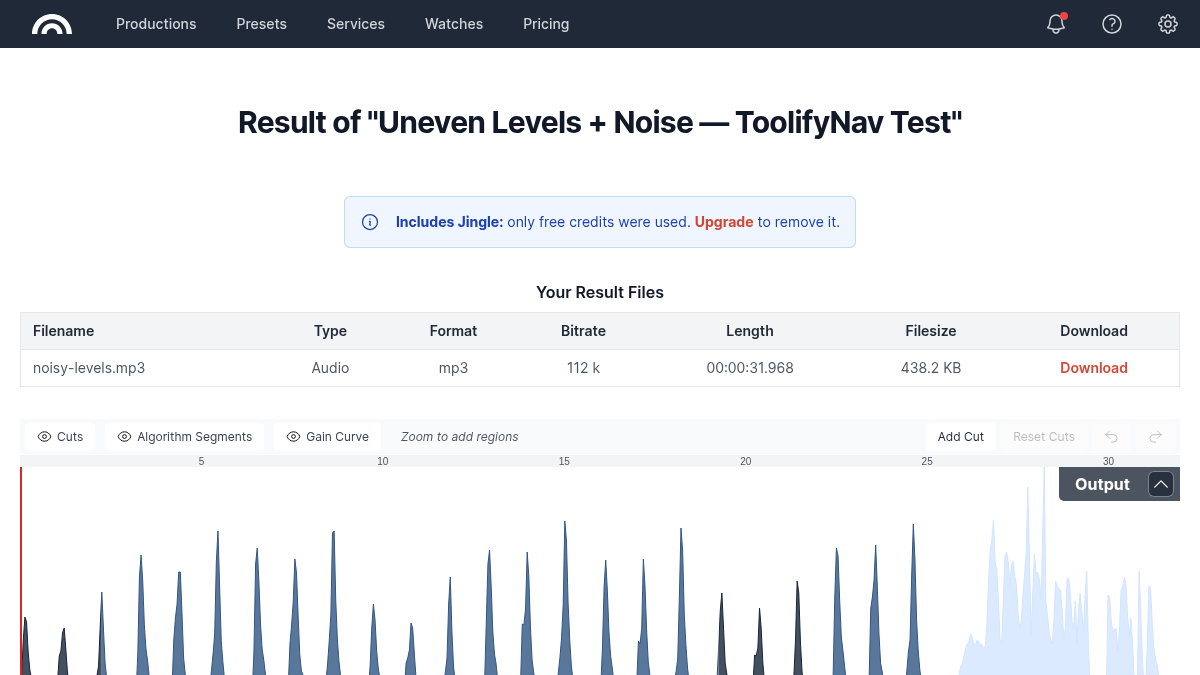
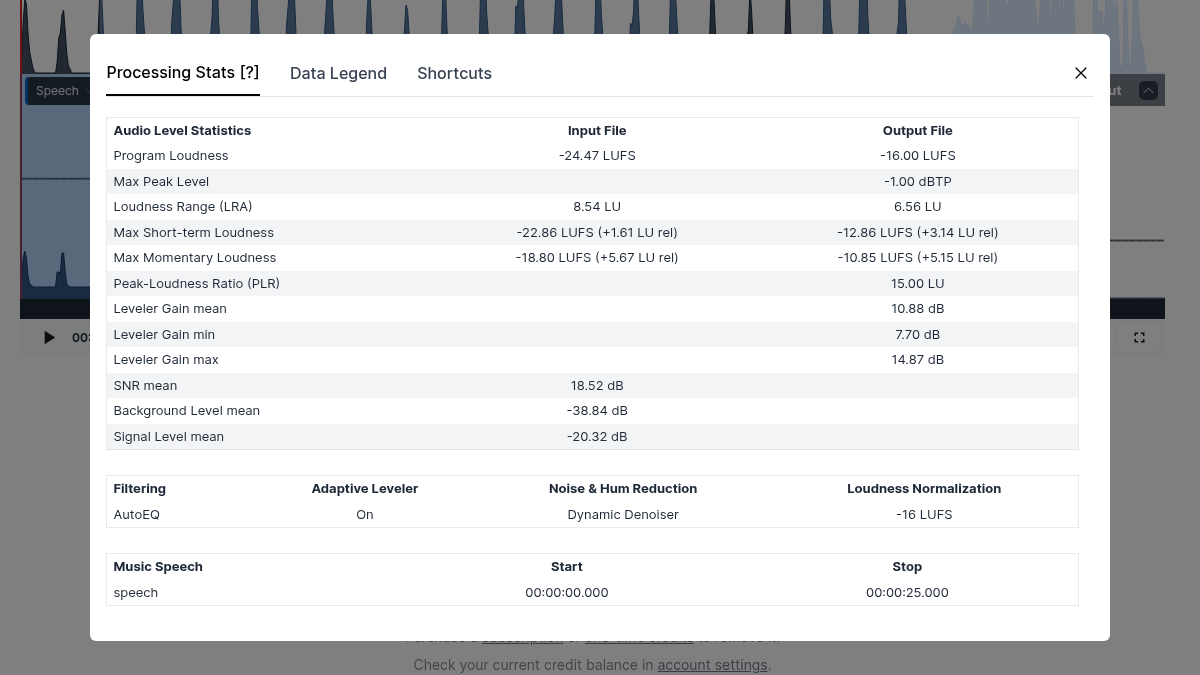
The stats are the satisfying bit. Program loudness went from -24.47 LUFS to exactly -16.00 LUFS. Loudness range narrowed from 8.54 LU to 6.56 LU, and max peak landed at -1.00 dBTP. The leveler’s mean gain was 10.88 dB, but the more telling numbers are the ends: 7.70 dB minimum, 14.87 dB maximum. It was not simply turning the whole file up. The gain curve visibly moves between my quiet and loud sections.
Auphonic labeled the whole 25-second body as speech and measured an input SNR mean of 18.52 dB. One oddity: I deliberately added 60 Hz hum, while the report says “Hum Reduction: Not necessary.” I am not going to translate that into “the hum vanished.” I did not do a proper headphone listening pass, so my evidence here is the rendered file, the waveform, and Auphonic’s own measurements.
Free output comes with something glued to the end
My 25.560-second source became a 31.968-second MP3. The extra 6.408 seconds are Auphonic’s jingle. The result page says “Includes Jingle: only free credits were used,” with Upgrade as the way to remove it. That is not a watermark on a web player; it is part of the file you download. Fine for testing whether the algorithms rescue a recording. Not fine if you want to publish that file as-is.
The pricing page I saw defaulted to yearly billing: Auphonic S was $11 per month for 9 hours per month, $132 billed yearly. One-time credits started at $12 for 5 hours. Paying also removes the jingle. Speech recognition and automatic shownotes/chapters are marked No on Free, and the “Automatic Chapters, Summary and Transcript” preset was disabled in my account with “only for paying users” in its name. At least the line is visible before you build a workflow around it.
I also tried a plain text file in the upload box. Auphonic rejected it with “Upload aborted. Please try again.” No unsupported-format hint, just retry. Pressing Start with no input after that produced no useful explanation either. It is a small rough edge, and it stood out because the rest of the form is unusually clear about what each algorithm will do.
This was one short, deliberately damaged speech composite, not a full podcast production. I did not test multitrack, video, transcription, external publishing, the API, or how the denoiser sounds over a long interview. What I did verify is the ordinary free path: real signup, real upload, all four cleanup stages enabled, an MP3 I could open from the result page, and measurements that matched the -16 LUFS target I chose.
Final rating: 4/5. I would happily use this when loudness and uneven speech levels are the problem and I do not want to open a DAW. Budget for credits if the file is going out publicly; the free tier proves the result, but the jingle means it is not a clean publishing tier. I keep the ToolifyNav listing updated if the pricing changes.
ToolifyNav Directory
Explore Auphonic on ToolifyNav
Automatic audio post-production service that levels, denoises, cuts filler words and masters podcasts, videos and audiobooks to loudness standards.
Keep Reading
Related posts
SaaS Reviews
Diffit Review: A Useful Worksheet in Seconds, but a 404 Became a Lesson (3/5)
Diffit turned my temperature notes into a correct grade-five worksheet, then rewrote it for grade two without losing the numbers. But it also invented classroom details and generated a polished lesson from a URL that returned 404, so the output needs a teacher’s source check.
SaaS Reviews
Knowt Review: A 2-Page PDF Became a Clean Study Guide in 30 Seconds, but Flashcards Are Behind the Paywall (3/5)
Knowt's AI PDF Summarizer turned a two-page PDF I wrote myself into a structured nine-section study guide in about 30 seconds, and stayed faithful to my source. The note body leaks raw LaTeX into doubled numbers, the word count is wrong, and Flashcards from the same PDF are gated behind ULTRA at $95.99/yr.
SaaS Reviews
Mureka Review: One Free Song a Day, and No Way to Download It (3/5)
Mureka generated a genuinely decent three-minute track from eight lines of my own lyrics on the free tier. Then it showed me what free means here: every download format is VIP, the newer model becomes a 60-second preview, and when the trial Gold runs out the composer answers with “Not Enough Gold”.