Grammarly vs QuillBot vs Wordtune: Which Free Writing Helper Survived My Real Tests
Hands-on Free paths: Grammarly 4/5 (score 55→61, its→it), QuillBot 4/5 (anonymous Standard/Fluency, Formal gated), Wordtune 3/5 (Please provide…, meter 9→8). Pick by job.
I ran three Free writing assistants myself in September 2026 — Grammarly on Sep 17, Wordtune on Sep 16, QuillBot on Sep 8 — and kept the scores honest. This is not a feature matrix scraped from pricing pages. It is what happened when I pasted real messy text and watched Free gates, meters, and odd suggestions land in the UI.
Quick scoreboard from the published ToolifyNav reviews:
Official sites: grammarly.com, quillbot.com, wordtune.com.
What I was trying to do
Three different jobs, on purpose, so the tools could fail in different ways:
- Grammarly: fix deliberate grammar mistakes in a 56-word sample inside the Free web Docs editor after email/password signup with Hotmail (no Google SSO).
- QuillBot: rewrite a 72-word work paragraph anonymously and see how far Free paraphrase modes go before Premium.
- Wordtune: turn a hybrid support/status-page request into usable line-level alternatives after email magic-link signup.
I did not start trials, enter cards, or invent results I did not see. Full session logs live in the three review posts linked above.
Grammarly Free — last-mile grammar, with one weird accept
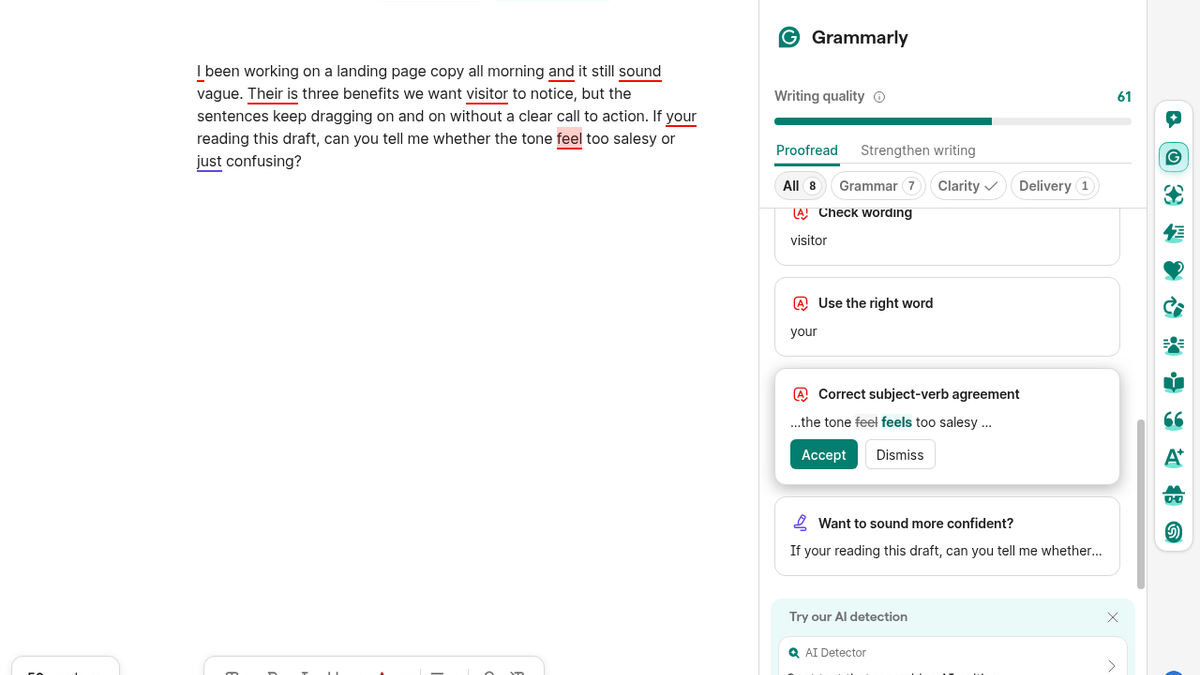
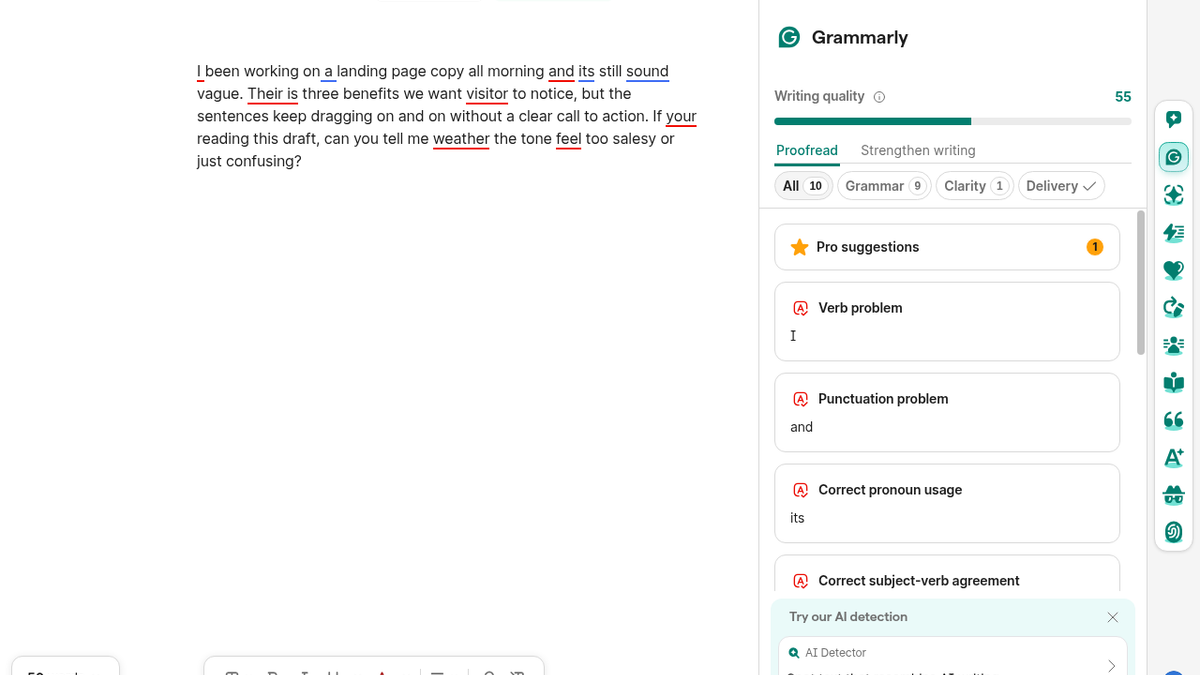
On Grammarly’s Free web Docs editor, suggestions showed up a few seconds after paste. The panel showed Overall score 55, All 10 / Grammar 9 / Clarity 1, plus a Pro suggestions count of 1. Live flags I saw included Verb problem, Correct pronoun usage, Rephrase, Use the right word, and extra hits on and / sound / visitor / your / feel.
I applied two live suggestions: weather → whether, and a “Correct pronoun usage” accept on its that wrote `it` instead of the it's I expected. After those accepts the score moved to 61 and the text visibly contained “whether.” No card was required. Loud Pro CTAs stayed in the header (Try Pro for $0) and on the plan screen (Try Pro for 10 days free! declined via No, thanks).
Hotmail worked despite the “Work or school email” label. Outlook verification landed in about a minute after one mis-ordered code entry showed “Invalid code. Please try again.” Full-sentence rewrite, AI detector, and plagiarism stayed marked Not available on Free in the plan comparison I opened. Free plan copy I saw highlighted Brainstorm with AI chat and Write without mistakes.
Pick Grammarly when you want grammar/clarity flags inside a Docs-style editor and you are willing to read each accept before applying it.
QuillBot Free — anonymous paraphrase with a hard ceiling
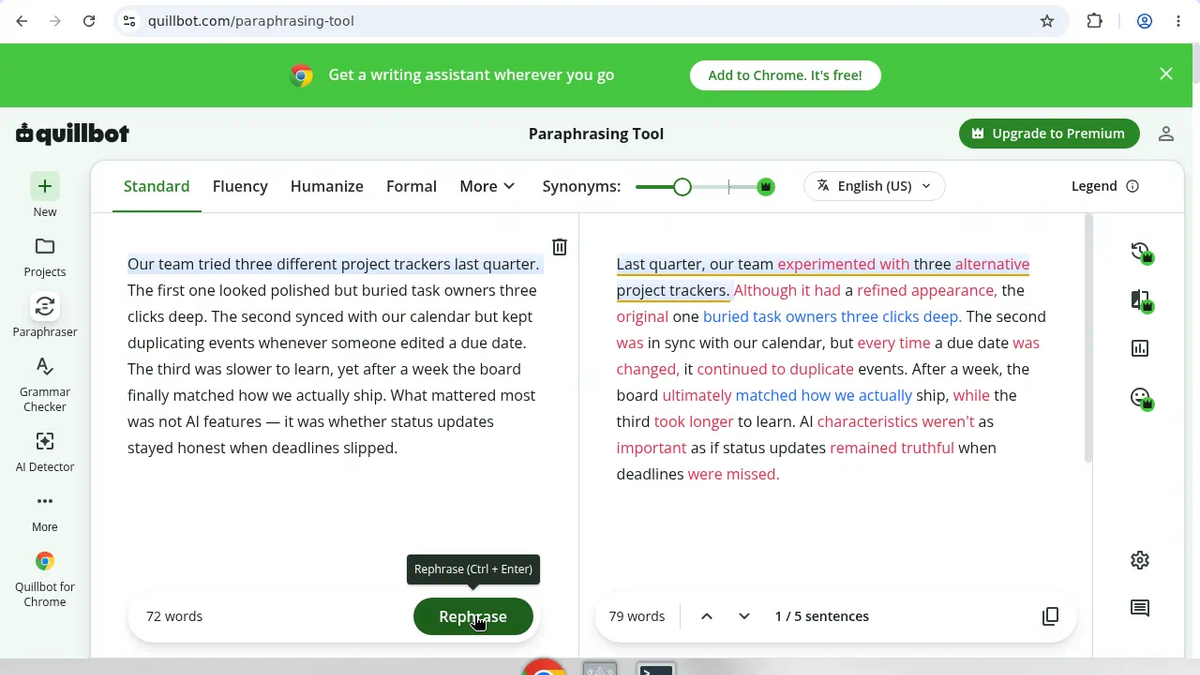
QuillBot was the only one of the three that let me finish the core rewrite without an account. I dismissed the Google prompt on the homepage, opened Paraphraser via the product’s left rail (a direct /paraphraser guess showed “It appears you are lost…”), and ran a 72-word project-tracker paragraph.
Standard returned a 79-word colored diff effectively immediately — for example “tried three different project trackers” became “experienced with three alternative project trackers,” and the slipped-deadlines line shifted toward “updates remaining truthful.” Fluency refreshed without a payment prompt (72 words, 5/5 sentences) and leaned readable (“the board mirrored how we actually ship”). Formal hit the gate: Unlock Premium Modes, paraphrase button disabled.
The Premium comparison page showed Free at $0: paraphrase up to 125 words, 2 paraphrase modes, Humanize up to 125 words / 6 uses/day, plus basic grammar/summaries and limited AI Detector. The page also warned that limits may vary across platforms.
Pick QuillBot when you want a short anonymous rewrite and a visible Free vs Premium boundary.
Wordtune Free — fast suggestions, wrong voice on first apply
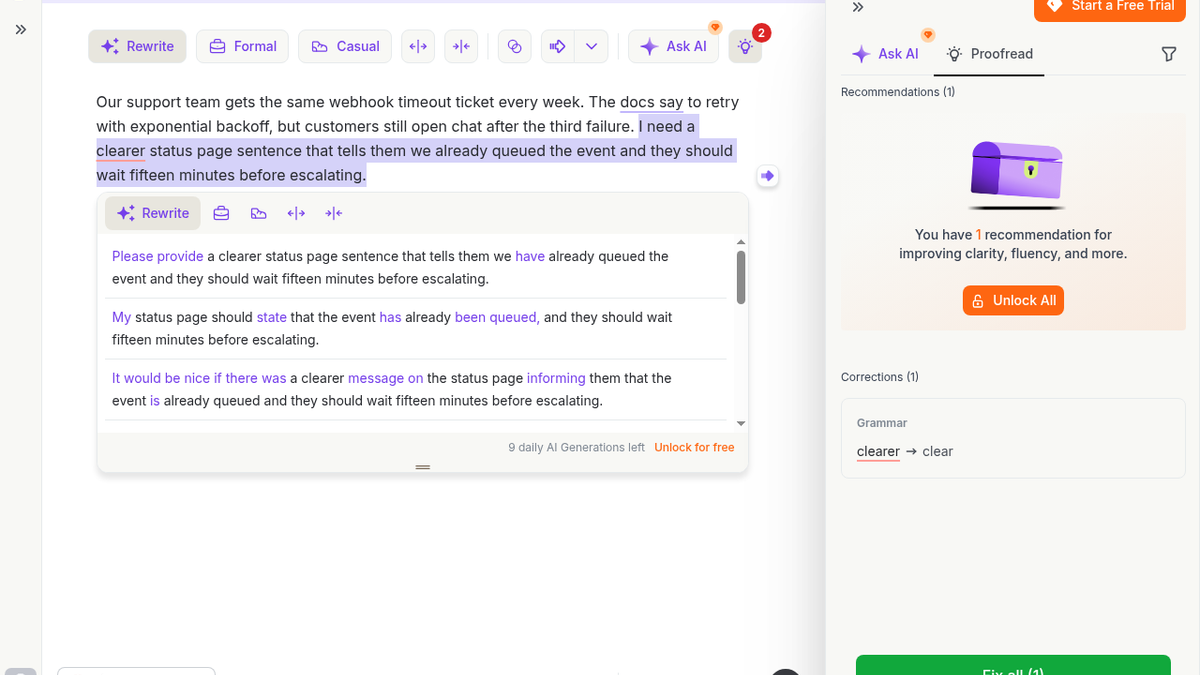
Wordtune redirected anonymous /editor traffic to signup. Email magic-link worked; no Google SSO, no card. Rewrite suggestions arrived in about 2–3 seconds with an easy-to-scan inline card. The first applied Rewrite turned my status-page request into instruction copy that started “Please provide…” instead of finished customer-facing status text. A more status-page-ish alternative existed on the same card (“My status page should state…”), but the first click was the bad one.
Formal also returned in ~2–3 seconds and stayed instruction-like (“Provide a clearer status page sentence that informs them…”). The Free meter dropped from 9 to 8 daily AI Generations left after those two actions. Visible Basic Free limits on the upgrade screen: 10 Rewrites & AI suggestions daily, 3 AI summarizations/month, unlimited spelling corrections and grammar checks. Advanced showed $6.99/mo billed yearly; Unlimited $9.99/mo billed yearly. Trial and Unlock All upsells were loud; I did not start a trial.
Pick Wordtune when you already have a sentence and will scan the suggestion rows carefully before applying the first rewrite.
How I would choose (same week, same hands)
- Need grammar cleanup inside an editor, no card: Grammarly Free — just do not blindly accept pronoun fixes after the
its→itsurprise. - Need a short rewrite with zero signup: QuillBot Free — stay under 125 words; Formal is Premium.
- Need line-level alternatives and you already expect to babysit the first suggestion: Wordtune Free — meter and trial CTAs are part of the product surface.
If two tools are already on your shortlist, the pairwise pages built from the same evaluations are live:
What I did not test
Browser extensions, mobile/desktop apps, Google/Apple SSO checkout paths, paid Pro/Premium/Advanced behavior after a card, QuillBot Humanize and AI Detector limits in practice, Wordtune Casual/Shorten/Expand/Ask AI, and any hard exhaustion of Free meters beyond the counters I saw. Scores stay tied to the Free paths above — not to marketing pages I did not run.
Sources: https://toolifynav.com/item/grammarly-vs-quillbot-vs-wordtune (official website, verified during review).
ToolifyNav Directory
Explore Grammarly on ToolifyNav
Last-mile grammar, tone, and clarity in the text boxes where writing actually happens.
Also Mentioned
More tools in this article
This tool on ToolifyNav
QuillBot
AI paraphrasing, summarizing, and grammar toolkit widely used by students and writers.
This tool on ToolifyNav
Wordtune
AI rewriting assistant — rephrase sentences for clarity, tone, and fluent English.
Keep Reading
Related posts
AI Tool Reviews
Grammarly Review: 4/5 — Free Fixed My Grammar, Then Turned “Its” Into “It”
Free Grammarly web Docs: 56-word paste, score 55→61 after weather→whether and a weird its→it accept. No card. Loud Try Pro for $0. Final rating: 4 out of 5.
SaaS Reviews
Wordtune Review: 3/5 — First Suggestion Said “Please Provide,” Not Status-Page Copy
Email magic-link into Wordtune Free: Rewrite and Formal in ~2–3s, but the first suggestion said “Please provide…” instead of status-page copy. Meter dropped 9→8. Final rating: 3 out of 5.
SaaS Reviews
QuillBot Review: 4/5 — Free Paraphrase Works Without Signup
I used QuillBot’s free paraphraser anonymously: Standard and Fluency both rewrote a 72-word work paragraph without signup, then Formal hit Unlock Premium Modes. Final rating: 4 out of 5.