NightCafe Review: A Rainy Buenos Aires Street in 7.6 Seconds, Free (4/5)
I signed up for NightCafe with email, typed a rainy Buenos Aires street prompt, and had a 1024×1024 frame back in about 7.6 seconds for 0 credits — then an Evolve run, a Prompt Magic warning, and a pricing page full of upsells.
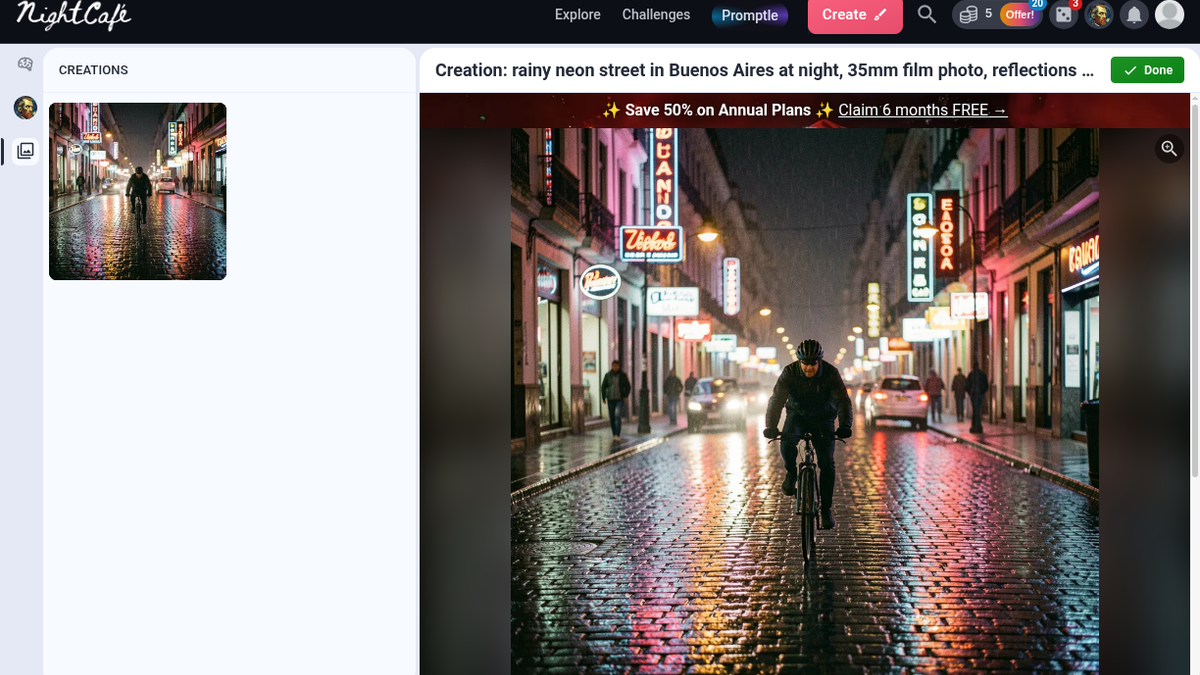
The cyclist came back riding straight at the lens. Helmet, dark jacket, wet cobblestones throwing pink and teal back up at him, a couple of cars and some pedestrians soft behind. It took about 7.6 seconds — I clicked Create at 22:25:55 on Sunday night and the frame was there at 22:26:03. Then I looked at the neon signs. Every one of them spelled nothing. Made-up words in tube lettering, the usual diffusion garble. It read less like Buenos Aires and more like a generic Latin street after rain, but as a mood frame it was usable on the first try, which is more than I expected from the free path.
That was NightCafe Creator, at creator.nightcafe.studio, which we list under image tools on ToolifyNav. The homepage says "The Home of AI Art" and puts a prompt box under it with "No payment or credit card required" in small grey type. A red banner across the top says "Save 50% on Annual Plans — Claim 6 months FREE." That banner follows you onto every page for the rest of the session.
Getting to the first free frame
Going to the studio logged out gives you "You need to be signed in to do this," with two choices: "Create an instant temporary account" or "Login now." I didn't try the temporary account. Login offered Google, Apple, Facebook and Email; I took Email, typed my Hotmail address and a password, hit Create Account at 22:23:26, and got the "Verify Your Email" screen. The mail — "Verify your email for NightCafe Creator" — was already sitting in the Outlook Focused inbox, not Junk. One click, "Your email has been verified," Continue.
There's still a little gauntlet after that. A terms screen with a required checkbox, plus an optional marketing-email box labeled "EARN 3 CREDITS" (yes, they pay you to accept newsletters). A Cloudflare Turnstile check that passed on its own. Then two survey modals asking what I plan to use it for and how much experience I have; I skipped both. From signup click to studio, about a minute.
The top bar showed 5 credits next to an orange "Offer!" pill with a 20 badge on it.
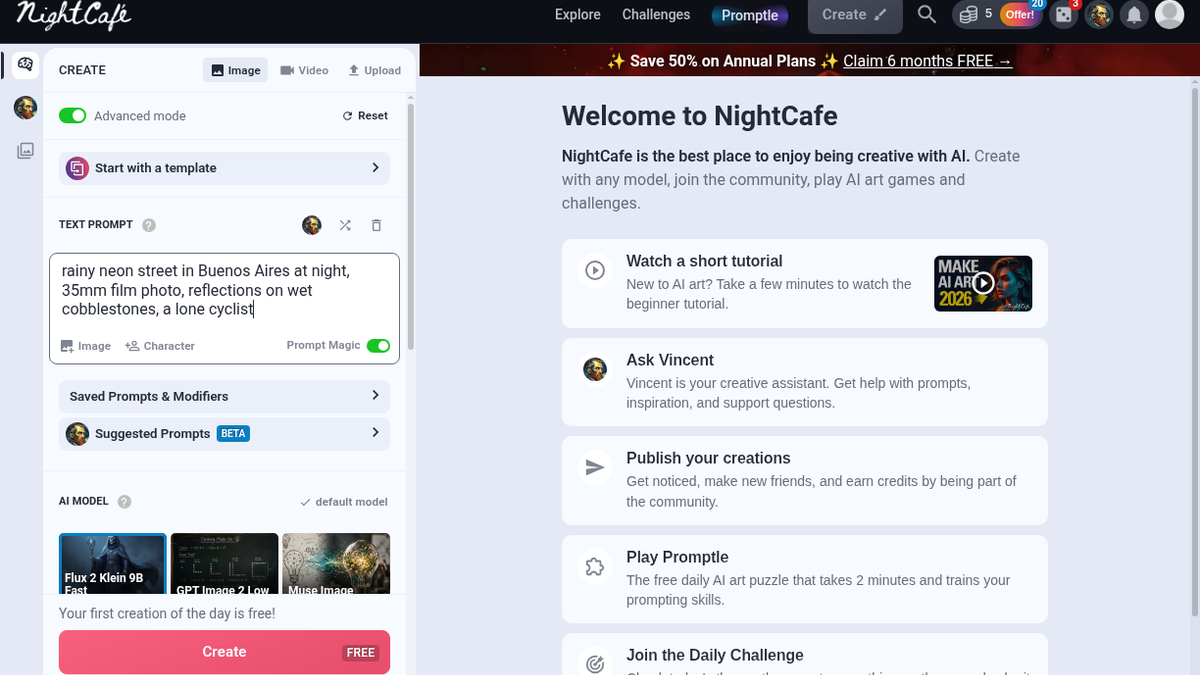
The Create panel opens in Advanced mode. The default model is Flux 2 Klein 9B Fast, with tiles for GPT Image 2 Low and Muse Image next to it, and right under the picker a line that says "Get unlimited Flux 2 Klein 9B Fast on the AI Hobbyist plan →". One image per run by default (1, 4 or 9), aspect ratio 1:1. I'd written "35mm film photo" in the prompt and still got a square, because I didn't change it — there are eleven ratios including 3:2 and 16:9, and I should have picked 3:2. Prompt Magic is switched on by default. Bottom of the panel: "Your first creation of the day is free!" and a pink button reading Create FREE.
The prompt was rainy neon street in Buenos Aires at night, 35mm film photo, reflections on wet cobblestones, a lone cyclist. Balance before: 5. After: 5.
Evolve, and a warning about my own settings
The creation page has a long row of actions: Animate, Prompt to Edit, Upscale, Creative Upscale, Expand, Adjust & Crop, Fix Faces, Remove Background, Duplicate, Evolve, and Publish, which advertises "EARN 1 CREDIT." Upscale lists Real-ESRGAN x4+, x2+ and a few variants, at 2 credits. With 5 in the account I left it alone.
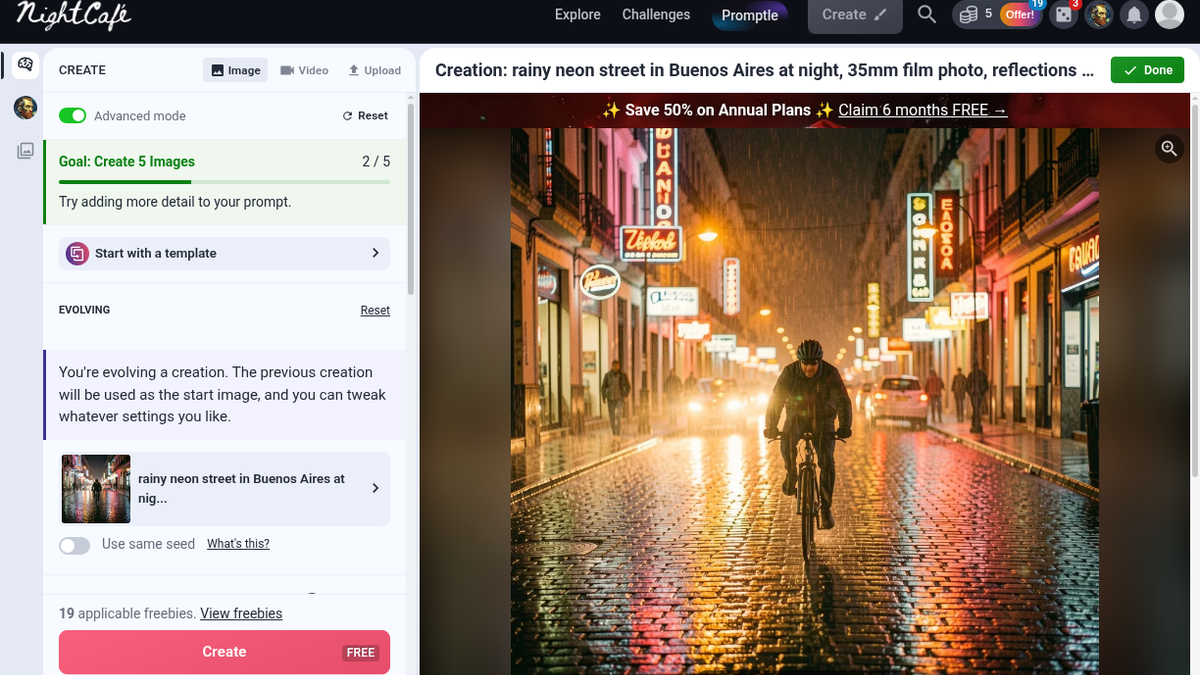
I used Evolve instead, which drops the previous image in as the start image, and added , golden hour neon glow, dramatic atmosphere to the prompt. The panel now said "Goal: Create 5 Images 2/5" and "19 applicable freebies. View freebies." So the 20 on that Offer badge was a freebie counter, and one had been used. Still Create FREE.
Clicking it threw a modal: "Warning: Prompt To Edit Model with Prompt Magic ON - You're using prompt magic while using a start image with a Prompt to Edit model. Your prompt will be edited and may not work as expected." A default setting warning me about another default setting. I confirmed at 22:28:07; done at 22:28:15, about 8.5 seconds. Balance still 5.
The second frame kept the composition almost exactly: same cyclist, same lean, same buildings, same cars. What changed was the light, which went heavy amber and copper with visible rain streaks. More golden than neon — the teal mostly disappeared. If you're trying to grade a scene a different way, that's the useful behaviour. If you wanted the neon pushed harder, Prompt Magic seems to have read "golden hour" as the main idea.
More → Download gave me FEGsl4imrMU9SZip5Hdb--0--jzML_.jpg: a 1024 × 1024 JPEG, 631,294 bytes, no watermark, no card prompt. Fine for a moodboard or a social post. Small for anything you'd crop hard or print.
Five credits, nineteen freebies, and the pricing page
This is the part I had to piece together. On a free account there are credits (I had 5), freebies (19 left after two runs), and the plans talk about "600+ relax credits/mo" on top of fast credits. Nothing on the free side explains all three in one place. My two runs cost zero credits; the first thing that would have cost real credits was the upscale. I didn't wait a day to see whether the freebies refill.
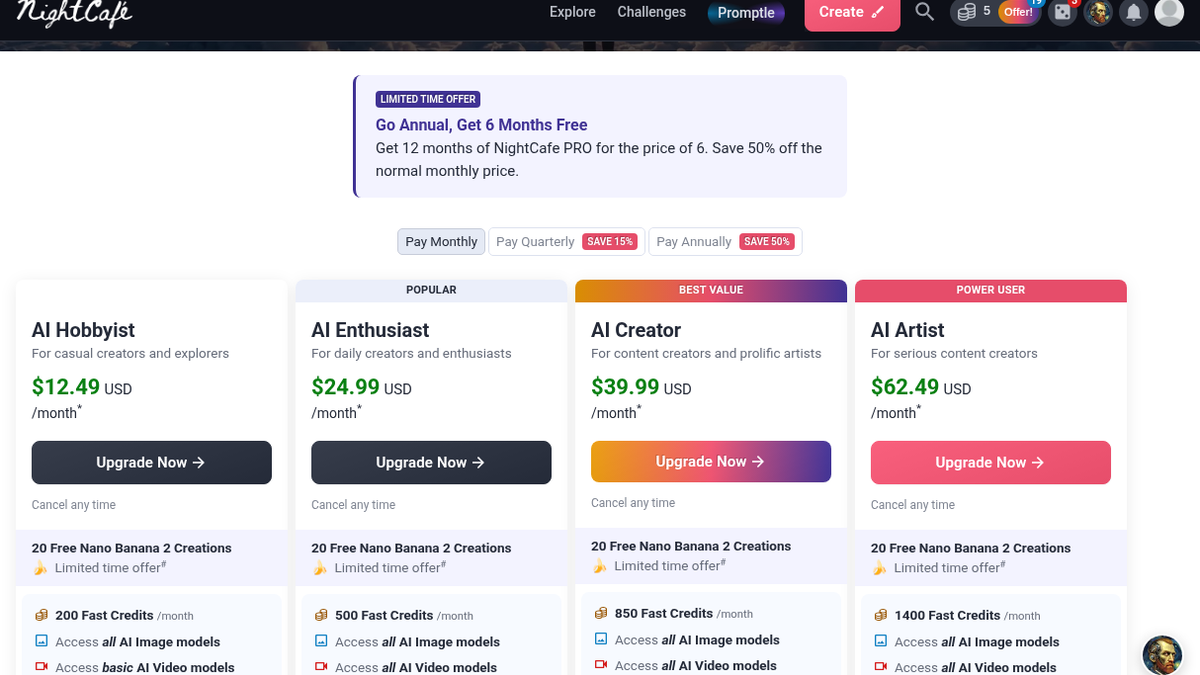
/pricing, monthly:
- AI Hobbyist $12.49 — 200 Fast Credits/mo
- AI Enthusiast $24.99 — 500 ("POPULAR")
- AI Creator $39.99 — 850 ("BEST VALUE")
- AI Artist $62.49 — 1,400 ("POWER USER")
Annual billing ("SAVE 50%") brings those to $6.24, $12.49, $19.99 and $31.24 a month; quarterly is "SAVE 15%." One-off packs run from $7.99 for 100 credits to $299.99 for 10,000, with 500 at $19.99 in between. I didn't open checkout.
Count the upgrade prompts I saw in ten minutes: the red banner, the Offer pill, the Hobbyist line under the model picker, a "LIMITED TIME OFFER — Go Annual, Get 6 Months Free" card on pricing, and the credit rewards for newsletters and publishing. None of them blocked anything. They're just always in the frame.
Where it fits for me
I'd use this for what I used it for tonight: blocking out a lighting idea before a shoot, or making a quick reference frame for a client who can't picture "wet street, warm practicals." Students and hobbyists poking at AI art for the first time can get real images out without paying, and the community side (challenges, the Promptle daily game) is clearly aimed at them; I didn't touch either. It's the wrong tool if you need readable signage in the image, large native files without paying for upscales, or a quiet interface.
Things I didn't get to: video through Animate, any upscale, Fix Faces, Remove Background, Expand, the temporary account, the mobile app, and the license terms for commercial use. Next time I'd switch Prompt Magic off before evolving and set 3:2 from the start.
Final rating: 4 out of 5.
ToolifyNav Directory
Explore NightCafe on ToolifyNav
Community-driven AI art studio with multi-model generation and daily free credits.