Quizgecko Review: 38 Questions From My Own Site Rules, Zero Wrong Keys, One Course a Month (4/5)
I pasted my own 273-word ToolifyNav submitter guide into Quizgecko and got 38 questions in 53 seconds without a single wrong answer key. Then the one free course of the month was gone, the mind map lost five categories, and the question I edited exported with '@' as its answer.

I was on question 24 of the text export, still waiting for it to slip. Somewhere in 38 questions I expected Quizgecko to tell me ToolifyNav badge links are dofollow, or that Premium listings need a badge too, because short sources usually get padded with plausible rules. The source was my own 273-word submitter guide. 26 tools every Monday, two in each of 13 categories. One review a day Monday to Thursday, a comparison page on Friday. Free plan means badge plus backlink, click Verify, seven days or it's auto-rejected. Paid plans skip the badge. Monday scan, badge-missing email, nofollow, info@toolifynav.com.
It didn't slip. Not once.
Getting there was quick and a little odd. The register form at quizgecko.com is name, email, password, confirm password. I submitted it at 22:17 on a Wednesday night and landed in onboarding with no verification step. Half an hour later I searched Outlook for "quizgecko" across Focused, Other and Junk and found nothing, not even a welcome mail. The onboarding is written for students: "Are you a..." Learner or Educator, a screen asking whether ADHD, Autism, Dyslexia or Dyscalculia applies to me, "What are you studying?" with Healthcare / Nursing, EMS, Law, IT / Cybersecurity and nothing near "runs a directory". Then "Choose a plan for after your trial", where I clicked "Choose free". My account came out named WorkablePascal3985.
Fifty-three seconds, a whole course

Of the ten sources on the create screen I took Text and pasted the guide. The configure page had all five boxes ticked by default: Questions, Flashcards, Study Notes, Podcast, Mind Map. Difficulty sat on Mixed, Max Questions on Auto. I left it and hit Generate at 22:19:30.
At 22:20:23 I had a "course" called "ToolifyNav Submissions and Directory Operations". Three modules of 12, 13 and 13 questions, 31 flashcards, four study notes, a podcast and a mind map. On top sat an AI-generated header image of a fake dashboard with labels like "Kari Moden", "Flooit" and "AI Toot Geolla". On a course about my own site, that was the first thing I saw.
I read all 38 against my text. No wrong answer keys, no invented rules. There's a distractor "Badge links are follow links" marked wrong, and the true/false "Premium and Highlight submissions require a homepage badge" keyed False, which are the traps I'd set for a human. My only quibble was a matching pair, "Creative visual work => Art", shaky when Image is also one of the 13.
What wore on me was volume. There are maybe 15 distinct facts in that guide, and Auto stretched them to 38. "The payment clears" gets asked as a multiple choice, a short answer and a fill-in-the-blank, then turns up again inside two matching questions. "Put the badge back and click Verify again" appears four times. One matching pair is a tautology: "Maker replaces the badge => Homepage badge is present again." If I sent this to a maker as a self-check, I'd delete half of it first.
The grader noticed which mistake I made
The editor shows "12 / 200" for the module. I rewrote question #0 to "How many brand new AI tools are added each Monday, and how are they distributed across categories?" with "26 brand new tools, with two in each of 13 categories" as the answer, hit Save Changes, hard-reloaded. It stuck.
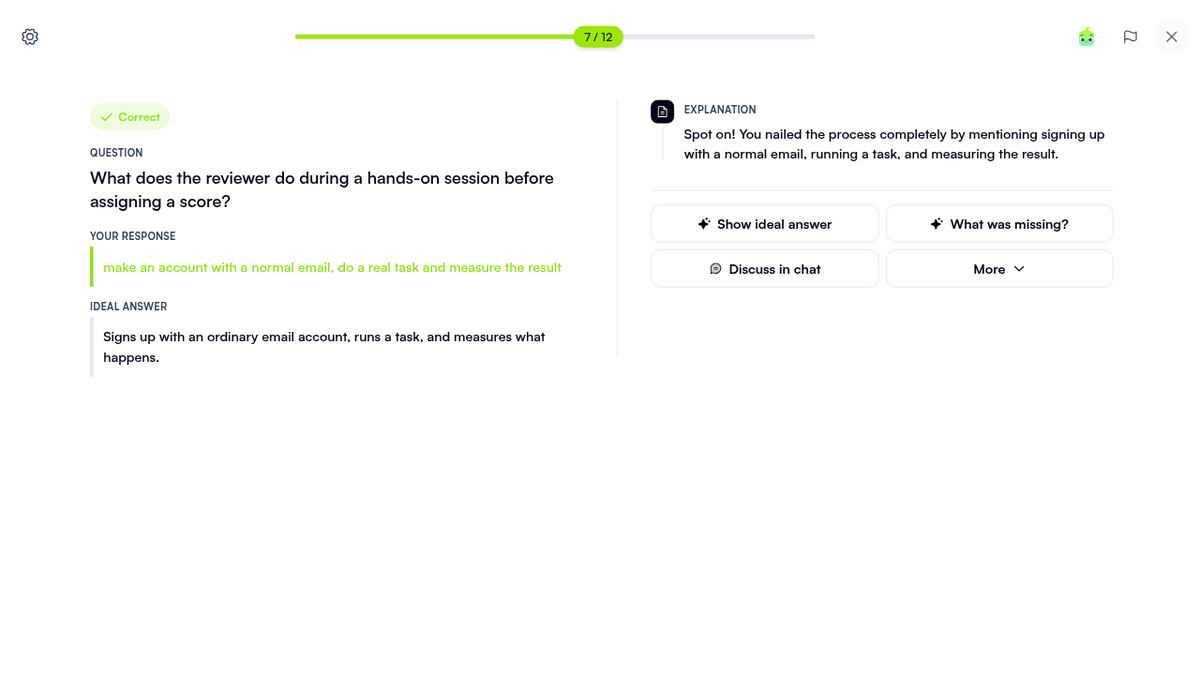
Practice mode shuffles the options and hands out "+15 XP" per hit. Short answers are graded by the AI, so I wrote one sloppy on purpose: "make an account with a normal email, do a real task and measure the result" for what a reviewer does before scoring. Correct, with "Spot on! You nailed the process completely by mentioning signing up with a normal email, running a task, and measuring the result." Then "26 categories" for the category count, which got "Oh so close, but you doubled the number!" It saw what I'd done wrong, not just that the string didn't match.
Podcast, flashcards, and a map with five categories missing

The extras are where the accuracy thins out. The flashcards are fine: 31 of them, a 1–4 spaced-repetition rating, memory tips like "Talk, then code." for Chatbots and Coding. The podcast, "Audio Overview: The Weekly Publishing Routine at ToolifyNav", is an 8:32 MP3 with one narrator. It gets the rules right and then says them again. Eight and a half minutes from 273 words, with lines like "A compact memory contrast is, free means badge plus backlink, then verify".
The mind map is the weak one. Under Core Categories it made up "Creative Categories" and "Productivity Categories", fit eight of my 13 categories into them, and dropped Chatbots, Education, Image, Marketing and Social. It also hung "Nofollow Badge Links" under "Automatic Rejection". The quiz knew there were 13. The map didn't.
Free exports that work, one CSV that doesn't
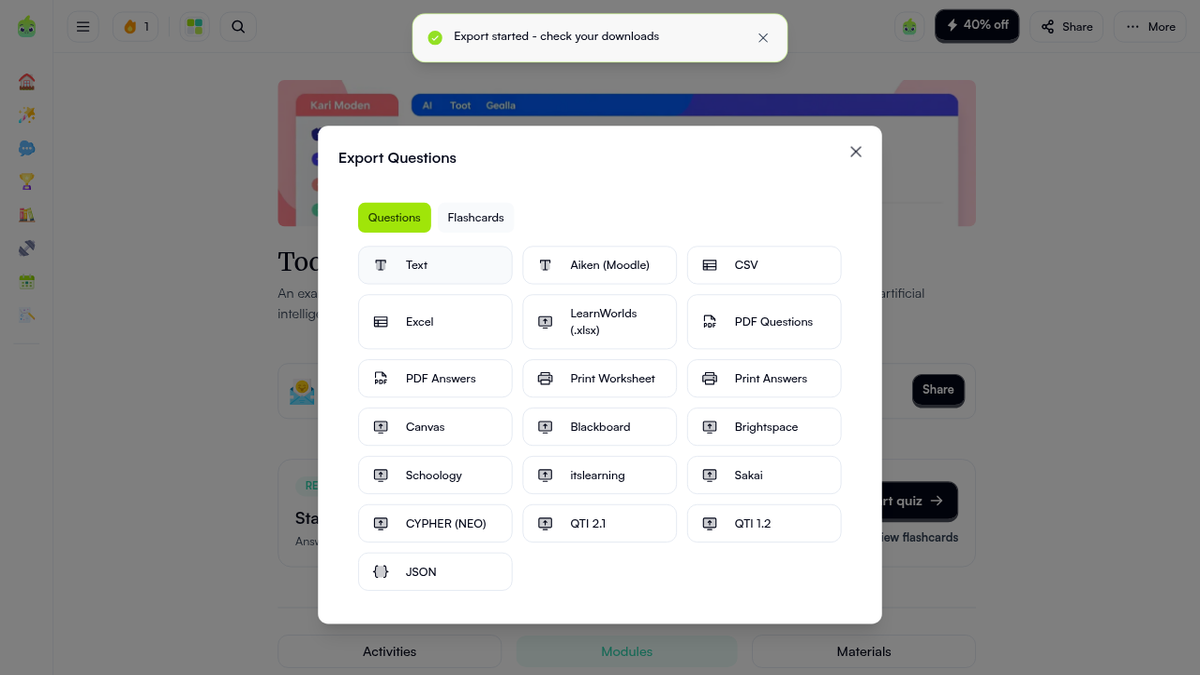
The Export Questions dialog lists 19 formats, from Text, CSV, Excel and JSON to PDF worksheets, Aiken (Moodle), Canvas, Blackboard, Schoology, Sakai and two QTI versions. None show a lock. The plain ones really are free: TXT at 14,996 bytes, CSV 12,491, Excel 8,993, JSON 87,805, a nine-page PDF worksheet at 186,266 bytes and a PDF answer key at 274,158. No watermark. The worksheet's matching section wraps badly, "1. Final" on one line and "rating" on the next, but it prints.
Then I opened the CSV. Every untouched question has a letter in CorrectAnswers. Question #0, the one I'd edited, has '@. The JSON export shows why: generated questions number their answers 1 to 4, my edited one got saved as 0 to 3, and one character before "A" is "@". I unticked and re-ticked the correct answer, saved, re-exported: still '@. Edit a question, move the CSV into another tool, and that question has no valid answer.
Canvas and QTI 2.1 fail differently. Click, toast: "Export started - check your downloads". Then a new tab with raw JSON, a 403 reading {"message":"LMS exports are only available on the Ultra and Organizational plans."}. Fair rule. It should be a lock icon in the dialog.
One generate, one month
Afterwards I went back to the create page to feed it my published Napkin AI review by URL. "Course limit reached. You have reached your monthly course creation limit." Behind it, "Upgrade to continue" with "Start Free Trial". That Auto-sized, everything-ticked first run was the whole free month, so URL, PDF and YouTube input stayed untried, along with the tutor chat, what a share link looks like to a logged-out visitor, and whether the LMS files import cleanly once paid.
The plans page puts Free at 1 AI course and 1 podcast a month, up to 10k tokens per course, "Basic AI model for shorter files". Plus is $16 a month, or $9 billed yearly ($108), for 20 courses and 75k tokens. Ultra is $29, or $23 yearly ($276), for unlimited courses, 150k tokens, up to five files and the LMS exports. A "40% off" button sits in the top bar the whole time.
I'd point a teacher or trainer at it, or a founder who wants to find out whether their FAQ says what they think it says, one document a month. If you need a stack of quizzes on free, or want them in Canvas without Ultra, it runs out fast. The listing is on ToolifyNav.
Final rating: 4 out of 5.
ToolifyNav Directory
Explore Quizgecko on ToolifyNav
Study platform that turns your notes, PDFs and slides into quizzes, flashcards, study guides and audio reviews.