Remove.bg vs Clipdrop vs Pixelcut: Which Free Background Remover Won
Free tier resolution is the whole decision: Pixelcut gave me 751x1080 with no login, Clipdrop 1024x744 after an SD downscale, Remove.bg 612x408 before it sunsets into Canva on 1 Dec 2026.
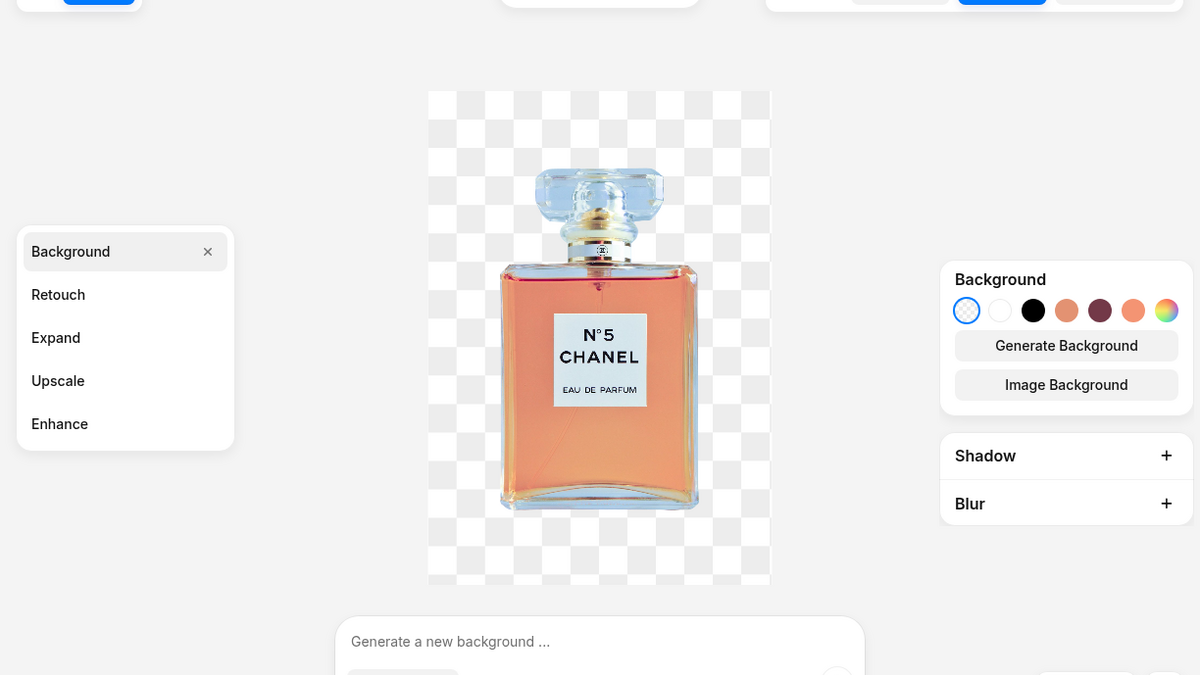
I needed product cutouts for store listings and did not want to open Photoshop, so I put three free background removers through one real job each. Remove.bg on 10 Sep 2026 with a dark product flat-lay, Clipdrop on 21 Sep 2026 with a 1200x872 watch photo, Pixelcut on 9 Nov 2026 with a portrait against a cluttered room. Every number below came out of those three sessions, not off a pricing page.
The short of it: on the free tier the deciding factor is the size of the file you walk away with, and the login wall in front of it. Pixelcut handed me an unwatermarked 751x1080 PNG without an account. Clipdrop handed me a clean 1024x744 PNG, but only after I downgraded my own image and passed a captcha. Remove.bg needed no account at all and then capped me at 612x408, which is a thumbnail.
Quick scoreboard from the published ToolifyNav reviews:
- Pixelcut - 4/5
- Remove.bg - 3/5
- Clipdrop - 3/5
Official sites: pixelcut.ai, remove.bg, clipdrop.co.
What I was trying to do
Three different jobs on purpose, so the tools would fail in different ways:
- Remove.bg: throw a messy flat-lay (speaker, charger, cable, pen, glasses, watch on a black background) at it anonymously and see whether the junk separates at all.
- Clipdrop: sign in with an email magic link, cut a product watch out of a grey studio shot, and try to relight it afterwards.
- Pixelcut: drop a portrait into the browser, take a usable cutout without handing over an inbox, then try to generate a studio background with it.
I did not start trials, enter cards, or invent results I did not see. Full session logs live in the three review posts linked above.
Remove.bg - no login, then a thumbnail
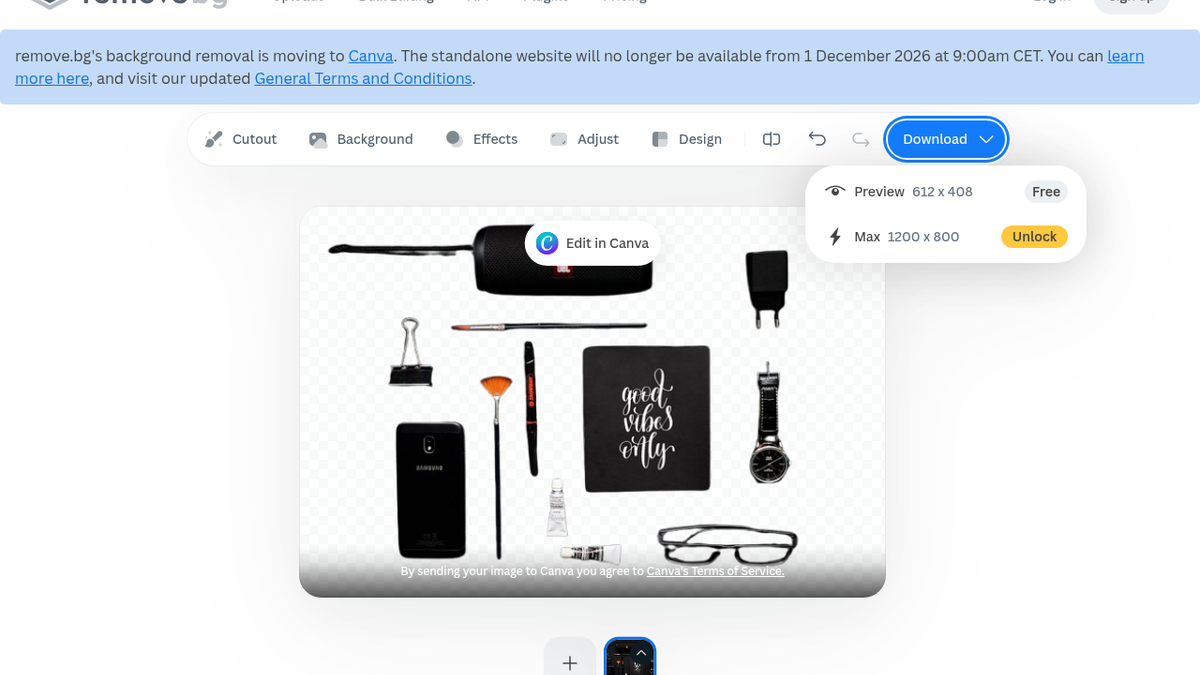
The upload page just worked. Roughly two to five seconds later the cutout was on a checkerboard, and the thin stuff I expected to die survived: the cable, the pen, the glasses frames all stayed, with no leftover black rectangle where the background should have been punched out. That surprised me more than the speed did.
What stayed annoyed me was a soft grey gradient along the bottom edge. On a dark flat-lay you cannot judge an edge, and that band would have bothered me on a real listing.
Then the download menu: Preview 612x408 - Free. Max 1200x800 - Unlock. I clicked free Preview twice and no file landed in my Downloads folder. I am not calling Remove.bg broken; from the UI, free is explicitly 612x408 and that resolution is a draft thumbnail, not a store asset.
One editor action did work for free. Background -> Color turned the checkerboard solid red with no signup, which was the part of the free path I trusted most. Background -> Magic answered 'Sign up to try' the moment I poked it.
And there is a clock on the whole thing. The homepage banner says the standalone site moves to Canva and shuts on 1 December 2026, 9:00am CET. Pricing was pay-as-you-go at 3 credits for $3, or 40 credits for $9/month, with credits that expire with the site. Stocking up on Remove.bg credits is planning against a deadline.
Pick Remove.bg when you want a five-second anonymous 'will this even separate?' check or a solid-colour mock, and 612x408 is enough.
Clipdrop - the mask was great, the editor fell over
Sign-in is a magic link, no Google SSO, no card. The link went to Junk (noreply@clipdrop.co, around 01:18 UTC) which is a small slap, but it worked.
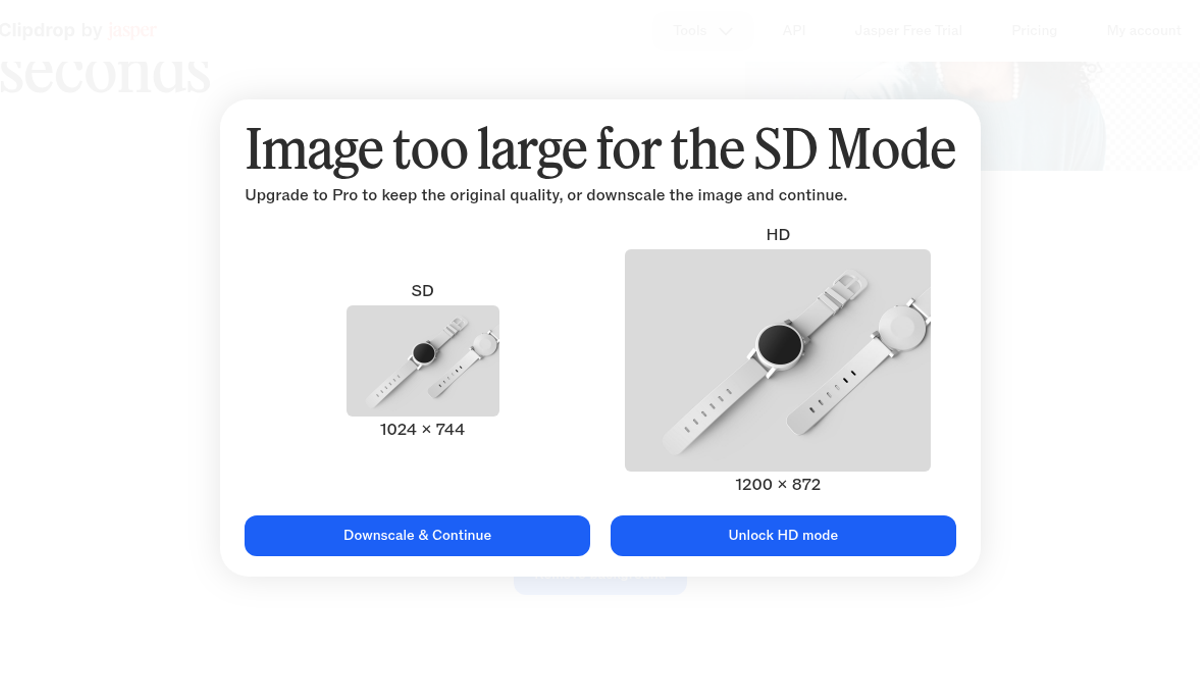
The first real wall was batch: a yellow banner saying free users can only process images one by one. Then the resolution wall, which is the part I would design differently. A 1200x872 product shot was 'too large for the SD Mode' - SD 1024x744 versus HD 1200x872 - and the only free path was Downscale and Continue. Forcing a downscale before you have even seen the mask is an upsell with a polite smile.
A Cloudflare Turnstile then slid into the bottom-right of the editor, inside the canvas, mid-job. I get why freemium tools fight bots. I still hate solving a captcha between upload and result.
About three to four seconds later the watch was on the checkerboard. Strap pinholes open, buckle edges clean, no halo on the bezel. Watch hardware usually shreds cheap removers, and this mask did not. The download was a 184 KB PNG at 1024x744 with a real alpha channel and no watermark.
Relight was where it broke. One spinner, another Turnstile, a blank canvas, and a red toast: 'Error during the relight process'. A fresh upload on the standalone relight page gave me an unhandled React error boundary with raw translation keys leaking into the chrome - /header/item/relight, /footer/a/home. That is not soft-launch roughness. Chaining cutout into relight was dead, so I stopped.
I also could not find my remaining credits. Pricing says free background removal is something like 20 per 24 hours, but the account menu, the settings, all of it just said 'Current plan: Free' and a Subscribe button. No number, no bar, no '17 left'. You fly blind until the wall.
Pick Clipdrop when you need one clean product cutout tonight and can live with a 1024x744 SD file, a downscale prompt and a captcha in the middle of it.
Pixelcut - the only one that gave me a file without signing up
No account required to start, no card, a clean dropzone with sample portraits under the button. The upload spun for roughly 3.8 seconds and the background was gone - cleanly lifted right down to individual curls along the jawline and the shoulder seam of the shirt, no white fringe.
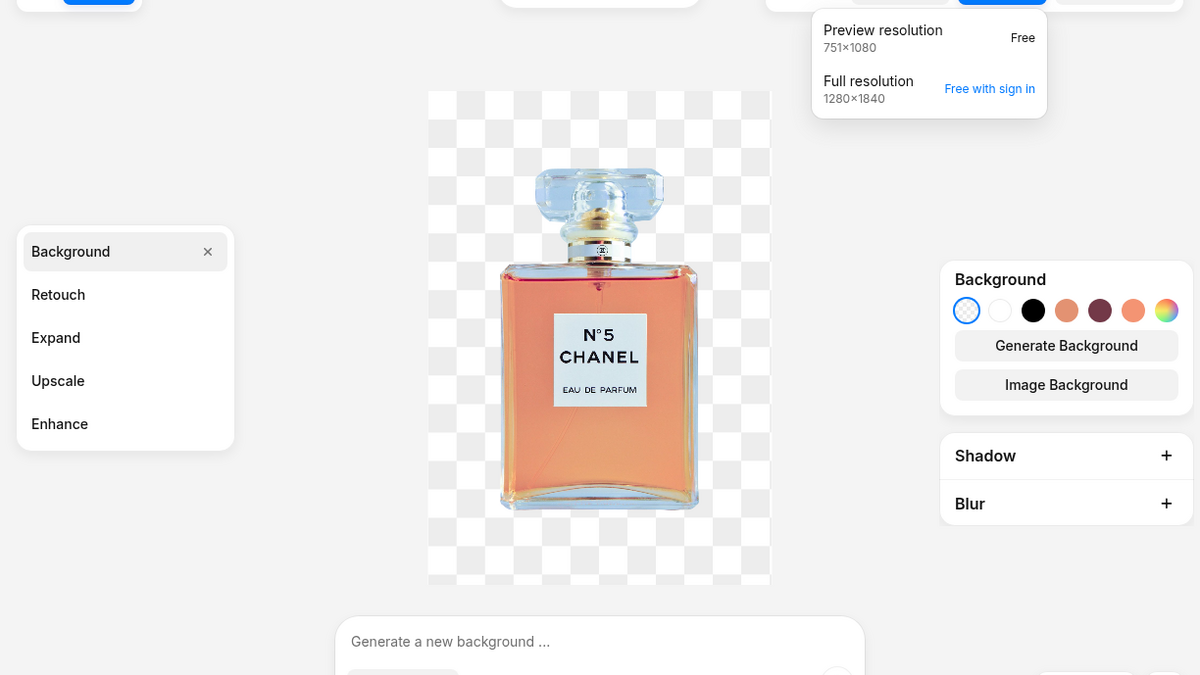
The download button is where these tools usually ambush you. Here the dropdown had two rows: Preview resolution 751x1080 - Free, and Full resolution 1280x1840 - Free with sign in. I clicked the preview row and a crisp transparent PNG landed on disk with zero watermark, zero login prompt, zero email capture.
751x1080 is not a throwaway thumbnail. That is taller than HD video and sharp enough for an Instagram story, a catalogue card or a newsletter header, with no account.
Then I typed 'minimalist white wooden table with soft sunlight studio' into the Model AI Backgrounds bar, and the canvas blurred behind a full-screen Sign Up or Log In modal with an illustration literally labelled Paywall. The prompt did not even run in preview mode. Generative expand, AI upscaling past standard resolution and the virtual actor staging hit the same door. The line Pixelcut draws is sharp: mask cutting is a generous free funnel, prompt synthesis is gated.
Worse, the account door itself was sticky. I picked email signup to keep this isolated from my main accounts, and a Cloudflare challenge iframe appeared under the text field and left the Continue button disabled.
Pick Pixelcut when you want a real cutout file at 1080p height without creating an account, and you can live without AI-generated backgrounds on the free tier.
How I would choose (same job, three hands)
- Need a usable PNG right now and refuse to sign up: Pixelcut - 751x1080 unwatermarked, about four seconds, no email.
- Need the mask on hard product shots and will accept a smaller file: Clipdrop - clean watch edges, but expect a downscale prompt, a captcha and no visible credit counter.
- Only checking whether a messy photo separates, or need a free solid-colour comp: Remove.bg - no login, no account, but 612x408 free and the whole standalone site sunsets into Canva on 1 December 2026.
If two of them are already on your shortlist, the pairwise pages built from the same evaluations are live:
What I did not test
A second photo per tool, hair, glass, metal reflections and people on Remove.bg and Clipdrop. Clipdrop's Upscaler, Text Remover, Uncrop and Replace Background. Pixelcut's bulk editor on a catalogue of SKUs, or its 600 monthly Pro credits on AI actors and complex jewellery. Paid HD on any of them. None of my conclusions here depend on paid behaviour, and I did not test anything I could not see.
Sources: https://toolifynav.com/item/remove-bg, https://toolifynav.com/item/clipdrop and https://toolifynav.com/item/pixelcut (official websites, verified during the reviews above).
ToolifyNav Directory
Explore Pixelcut on ToolifyNav
Mobile-first AI product photo editor for background removal, batch edits, templates, and on-brand catalog visuals.
Also Mentioned
More tools in this article
This tool on ToolifyNav
Remove.bg
One-click AI background removal for product photos, portraits, and design assets.
This tool on ToolifyNav
Clipdrop
Utility belt for the photo in front of you: cleanup, uncrop, relight, replace background.
Keep Reading
Related posts
SaaS Reviews
Pixelcut Review: A Clean 1080p Cutout in Four Seconds, Then an Account Wall for the Studio (4/5)
Pixelcut cut out a portrait onto a clean canvas in under four seconds and handed over an unwatermarked 751×1080 download without a login, but prompt-driven AI backgrounds and full resolution hit an immediate account wall.
AI Tool Reviews
Clipdrop Review: Sharp Free Cutouts, Then the UI Falls Over (3/5)
Free Clipdrop cutout on a watch photo in a few seconds — sharp mask, watermark-free PNG after SD downscale. Relight crashed, no credit meter, Turnstile mid-job. Final rating: 3 out of 5.
SaaS Reviews
Remove.bg Review: 3/5 — Fast Anonymous Cutouts, Low-Res Free Export, and a Canva Sunset Date
Anonymous Remove.bg cutout in a few seconds on a dark flat-lay. Free Preview is 612×408, solid red edit worked, Magic wants signup, site sunsets into Canva 1 Dec 2026. Final rating: 3 out of 5.