Uizard Review: Fast Multi-Screen AI Wireframes with Friction in the Margins
Uizard turned a single prompt into a multi-screen coffee app prototype in 45 seconds without asking for a credit card. The vector canvas is genuinely editable, though you'll run into tight component limits, a spam-folder detour, and an export flow that pushes you toward developer handoff.
I wanted to see if Uizard could actually deliver an editable, multi-screen mobile prototype from a text prompt without trapping me behind a credit card form. Too many AI UI tools show slick landing page demos, only to lock the canvas the second you try to build anything real.
On ToolifyNav, Uizard is listed as a freemium design and prototyping tool (official site: uizard.io). I went directly to the web app, set up a standard free account, and worked through the entire path from prompt to preview.
No paid trial, no card details entered. Everything here is strictly what a free user sees in one sitting.
The Hotmail Junk folder detour
I started at https://app.uizard.io/sign-up/ using a standard Hotmail email and password. I intentionally skipped Google and Microsoft single sign-on because I wanted to see how the regular email verification behaved.
The signup itself was fine. The weird part was waiting for the email. The verification message from noreply@uizard.io never showed up in my inbox. After a minute of staring at an empty inbox, I checked my Outlook/Hotmail Junk folder, and there it was. If someone doesn't think to dig through spam, their onboarding ends right there.
Once I clicked the verification link, I cleared the required onboarding questions and accepted the terms. I declined the optional marketing consent, and the app routed me to the workspace through https://app.uizard.io/login.
Prompts to screens: Bean & Brew in 45 seconds
Inside the workspace, I selected the free Autodesigner text-to-design option.
I typed in a prompt describing a mobile login flow for a coffee shop concept called Bean & Brew. I hit generate and waited.
The build took roughly 45 seconds. I honestly expected a single disconnected mockup screen. Instead, I liked what came out more than I anticipated: Autodesigner generated a full multi-screen prototype with a welcome screen, login and registration flows, plus menu and ordering screens.
The editor laid out thumbnail previews cleanly. Up in the interface header, a small counter showed 163/400 components used.
The first result was better organized than I expected. Form fields lined up, the coffee theme carried across screens, and the pieces felt like real UI components rather than flattened image blocks.
Editing on the canvas and catching a text glitch
I wanted to see whether the generated screens were actually editable, rather than polished mockups I couldn’t do much with.
I clicked into the cover/login screen to test the vector editing. The design included an orange circular-arrow button icon. I selected it and swapped the fill to a light cream color (roughly #f2e0ce). The canvas updated instantly, and the surrounding layout stayed perfectly in place without distortion.
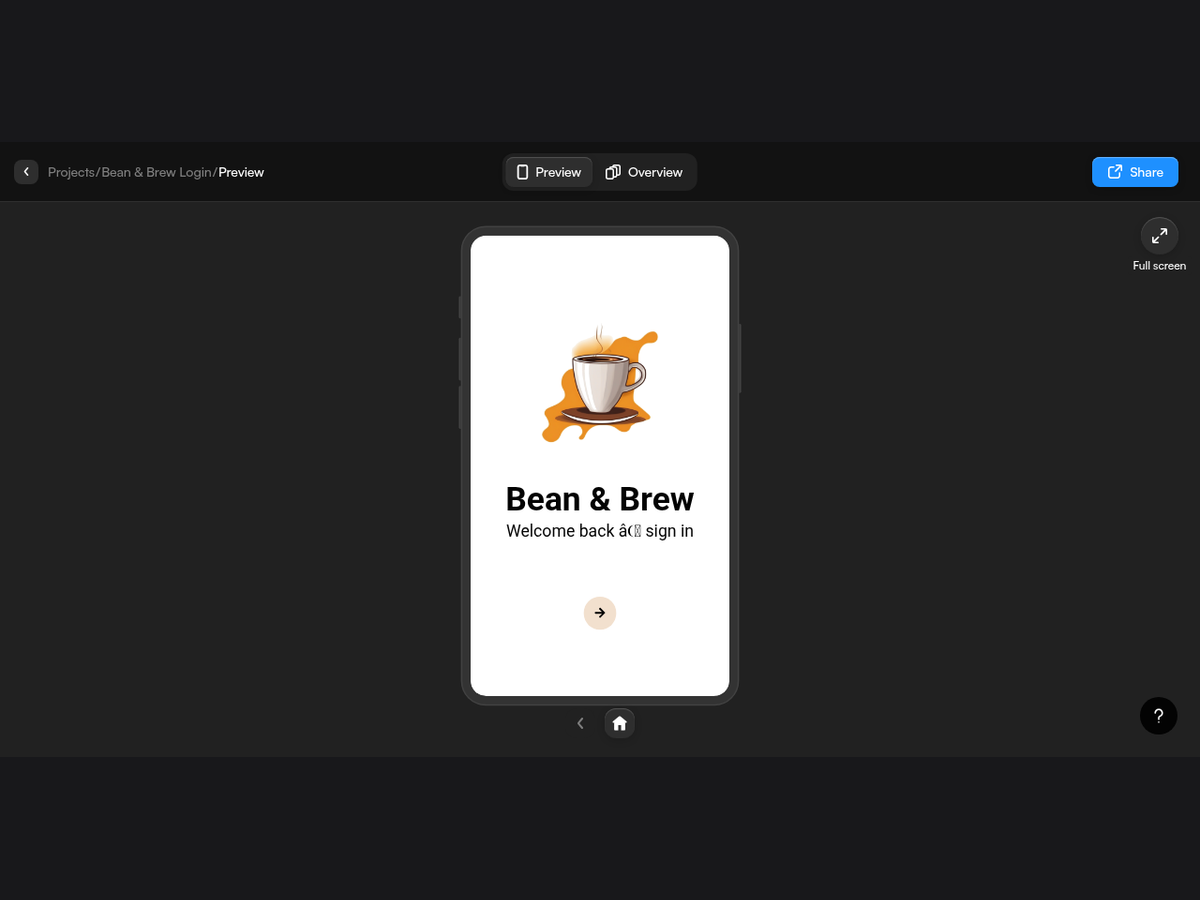
Then I clicked Preview to test the flow. The prototype launched right inside the browser without throwing up an upgrade wall. Tapping through the screens felt responsive and fluid.
Then I spotted a careless string bug right on the header: Welcome back â© sign in.
It is a minor string parsing bug, not a product-breaking failure. Still, on a design tool that sells visual polish, a broken symbol jumps out immediately.
Sharing and the Export-to-Handoff surprise
Once the screens were in decent shape, I looked into sharing and exporting the project.
Clicking Share opened a modal titled “Share Bean & Brew Login” with three tabs: Share, Publish, and Embed. Under the Share tab, the text stated: “Add new members to your project” and “People invited will be added to your organization.” It also pointed out: “This project is Public to your organization, everyone within the organization can access.”
So sharing defaults to organization members rather than spitting out a public link on the spot. I didn't send external invites for this run.
Exporting was more disorienting. I clicked Export in the top right, expecting a clean little download dialog to grab a JPG, PNG, or PDF. Instead, the screen shifted into Handoff Mode with an intro banner: “Welcome to Handoff Mode 👋 Select any screen or component to export visuals and inspect React and CSS code.”
For a second I thought I clicked wrong. But developer handoff and code inspection are paid features, so I stopped there. I didn't trigger a paid trial or download paid assets, and I couldn't confirm a standalone direct image download dialog outside of that Handoff view.
Free plan limits vs. paid tiers
I pulled up the pricing page on uizard.io to see what constraints were governing the session:
- Free ($0): “For students and hobbyists.” Unlimited free viewers and commenters, 3 AI generations per month, Autodesigner 1.5, 2 projects, and 10 free templates. The feature list specifies up to 5 screens per project, 400 components per organization, up to 5 saved custom templates, self-serve support, and Export to JPG, PNG, and PDF at 1x resolution only.
- Pro ($12/month billed annually, marked “Save 40%”): 500 AI generations per month, Autodesigner 2.0, developer handoff in React and CSS, up to 100 projects, private projects, and all templates.
- Business ($39/month billed annually): 5,000 AI generations per month, faster AI generation, custom brand kits, unlimited projects, and priority support.
- Enterprise: Custom contract pricing with unlimited AI generations, unlimited teams, design-system setup, and an AI data SLA.
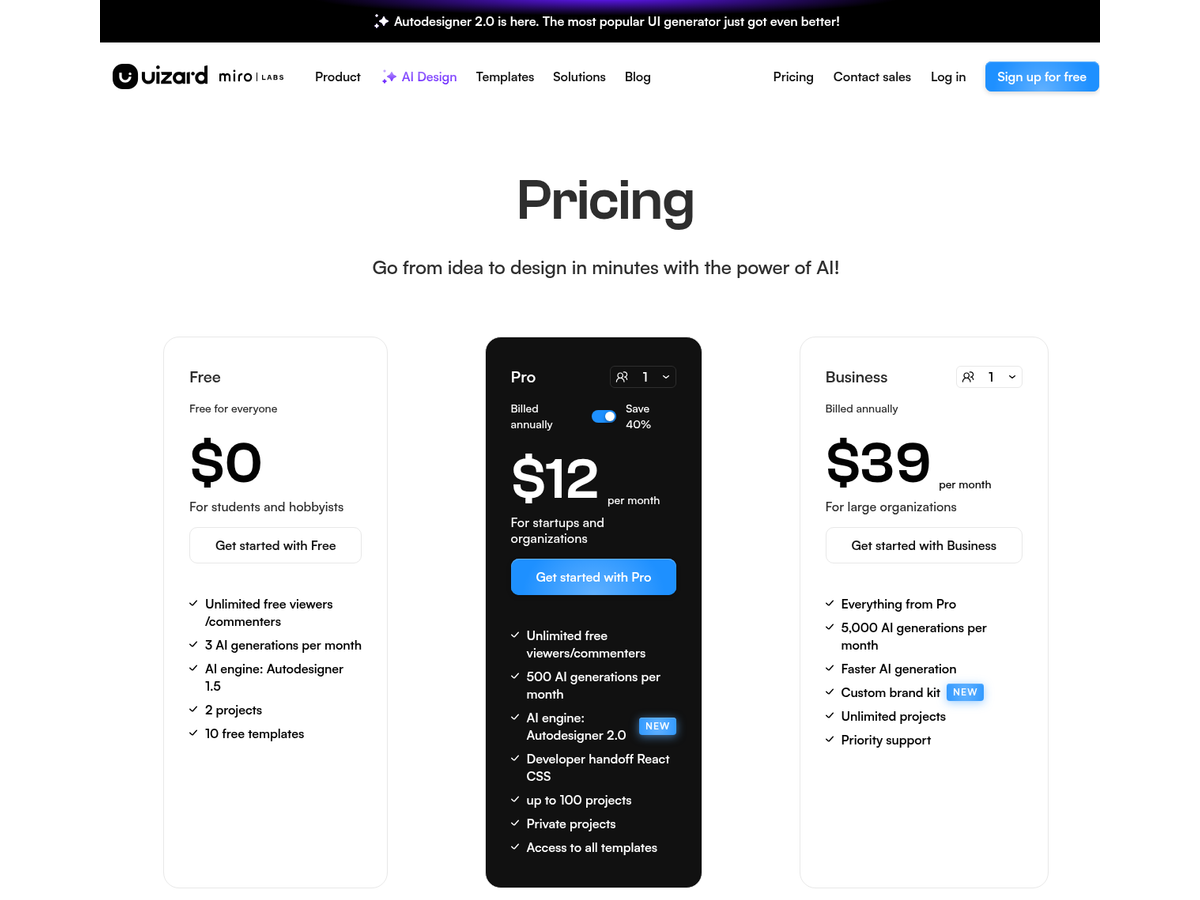
The 400-component limit sounded generous until I noticed this single test project had already used 163. I went back to the pricing page because that didn’t match how “free forever sandbox” usually feels in my head. Three AI generations per month and 400 components disappear faster than they sound. With 1x-only exports on top, I wouldn’t count on the free plan for ongoing work. The limits start to matter pretty quickly.
Who this actually works for
If you are a founder or product lead who needs to take a concept from a rough idea to a clickable, editable multi-screen prototype in under a minute, Uizard does the job. That 45-second Autodesigner run delivered an actual working wireframe layout, not a flat JPEG.
I wouldn’t count on the free plan for ongoing work, though. Three AI generations per month and 400 components disappear faster than they sound.
Verdict
Uizard generated a coherent, multi-screen coffee app prototype in roughly 45 seconds on its free tier. The canvas lets you make quick vector tweaks, and Preview works without shoving you into a paywall first.
What kept it from a 5/5 were the smaller annoyances: the verification email went to Junk, Export unexpectedly pushed me into Handoff Mode, the free limits are tight, and Preview showed a broken text string.
Final rating: 4 out of 5.
Sources: https://toolifynav.com/item/uizard (official website, verified during review).
ToolifyNav Directory
Explore Uizard on ToolifyNav
Sketches and prompts become editable UI mockups so teams can argue about screens early.
Keep Reading
Related posts
SaaS Reviews
Jenni Review (4/5): Real Citations, Paywalled Bibliography
I asked Jenni for a cited paragraph on the daguerreotype. Every source it cited was a real paper, three of four actually backed their sentences, and a paraphrase took four seconds. The reference list itself is paywalled on free. Final rating: 4 out of 5.
SaaS Reviews
Paperpal Review: 7 of 7 Planted Grammar Slips Caught on the Free Tier (4/5)
I pasted an 86-word paragraph with seven planted grammar slips into Paperpal's free tier. It caught all seven, rewrote one sentence with Make Academic in about 2.5 seconds, and quietly charged 11 of my 200 monthly edits before I'd accepted a single fix.
SaaS Reviews
Quizgecko Review: 38 Questions From My Own Site Rules, Zero Wrong Keys, One Course a Month (4/5)
I pasted my own 273-word ToolifyNav submitter guide into Quizgecko and got 38 questions in 53 seconds without a single wrong answer key. Then the one free course of the month was gone, the mind map lost five categories, and the question I edited exported with '@' as its answer.