Napkin AI
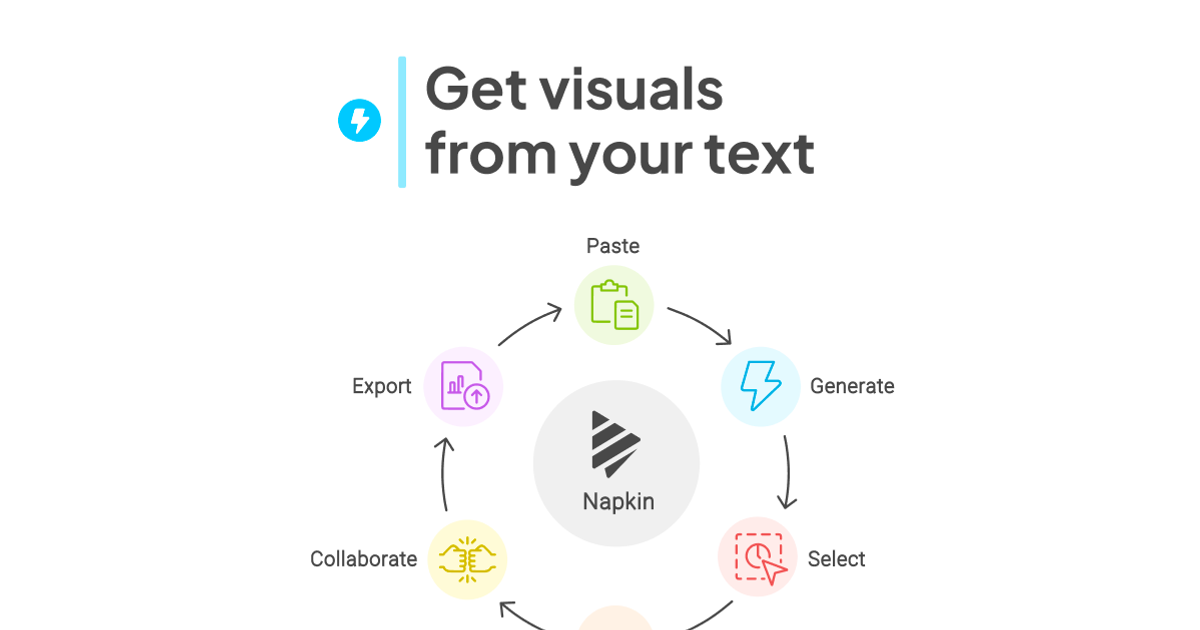
Text-to-visual tool that turns pasted paragraphs into editable diagrams, flowcharts, mind maps and charts for slides and docs.
Evaluation
What to know
Best for
- Consultants, educators and PMs explaining processes in slides
- Writers illustrating blog posts and documentation
- Marketers producing LinkedIn explainers
Not ideal for
- Pixel-perfect design or illustration work
- Complex technical diagrams like UML or network maps with strict notation
- Data analysts needing advanced charting
Key features
- Generate diagrams, infographics, mind maps and flowcharts from existing text
- Data charts and beta presentation-deck generation
- Full post-generation editing of colors, shapes and icons
- Export to PNG, PDF, SVG and PPT
- Brand Studio, team billing and API
Pros
- No prompt engineering — works directly from your prose
- Visuals stay editable instead of flattened images
- Generous free tier for occasional use
Cons
- Free visuals carry Napkin branding
- Credits scale with word count, so long passages cost more
- Slide generation is still in beta
ToolifyNav verdict
Napkin AI solves a small but constant office pain — the gap between a clear paragraph and a slide someone will actually look at — and it does it without asking you to learn prompting. The editable output is the important design decision: generated visuals become a starting point you can bend to your brand, not a flat image you have to accept or reject. It will not replace a designer or a proper diagramming tool for strict technical notation, and long passages burn credits. For people who write a lot and present often, the Plus plan pays for itself in a week of decks.
About
About Napkin AI
Napkin AI targets a familiar moment: you have written the explanation, and now you need a diagram that does not look like default clip art. Instead of prompting, you paste or import your existing text — Napkin accepts PPT, DOC, PDF, HTML and Markdown — select a passage, and the app proposes several relevant visuals. You choose one and keep editing.
Output types include infographics, process diagrams, flowcharts, mind maps, data charts and, in beta, full slide decks. Everything remains editable after generation: change colors to match your brand, restyle or reshape individual elements, swap icons, or take a visual apart and rebuild it. Finished visuals export as PNG, PDF, SVG or PowerPoint, so they drop into presentations, documents, social posts or blog articles. A Brand Studio stores colors and fonts, and an API lets teams generate visuals inside their own workflows.
Usage is metered by AI credits, roughly one credit per word selected for generation. The free tier refreshes a weekly credit allowance and includes unlimited editing, imports and PNG/PDF export, but stamps Napkin branding on visuals. Plus removes branding, adds SVG and PPT export and brand styles; Pro adds exclusive designs, unlimited custom branding and font upload. Napkin says it does not use your data to train models if you opt out of data sharing, and its contracts bar AI subprocessors from training on customer data.
Related
More in Office & Productivity
Same category — not a curated competitor list.
Discover More
Weekly digest
Get weekly AI tools + hands-on reviews
A short digest of new tools and hands-on breakdowns — unsubscribe anytime.