Hemingway Editor Review: Post-Graduate Sludge to Grade 12 in Seconds, Hidden Sentence Math, and Export Behind a Paywall (4/5)
I pasted 112 words of dense optical filter technical copy into Hemingway Editor Plus to see if its AI rewrite lives up to the iconic web editor. It instantly flagged my 48-word run-on sentence as Post-Graduate sludge, split it into three clean statements, and dropped the readability score to Grade 12. But while the free web app stays open, file imports, exports (Word/HTML/Markdown), and target grades are paywalled behind $8.33 to $12.50/mo, and credits are metered strictly by sentence rather than word counts.
For over a decade, Hemingway Editor has been the go-to web tool for stripping bloated jargon out of blog posts, technical essays, and pitch decks. Its pastel color-coded highlights—yellow for hard sentences, red for cognitive traffic jams, blue for weak adverbs, and purple for ten-dollar words—were built on ruthless minimalism. But with Hemingway Editor Plus, the team bolted an AI assistant directly onto the classic canvas. I registered a fresh account today to find out whether their AI genuinely understands cadence or just spits out generic corporate paste.
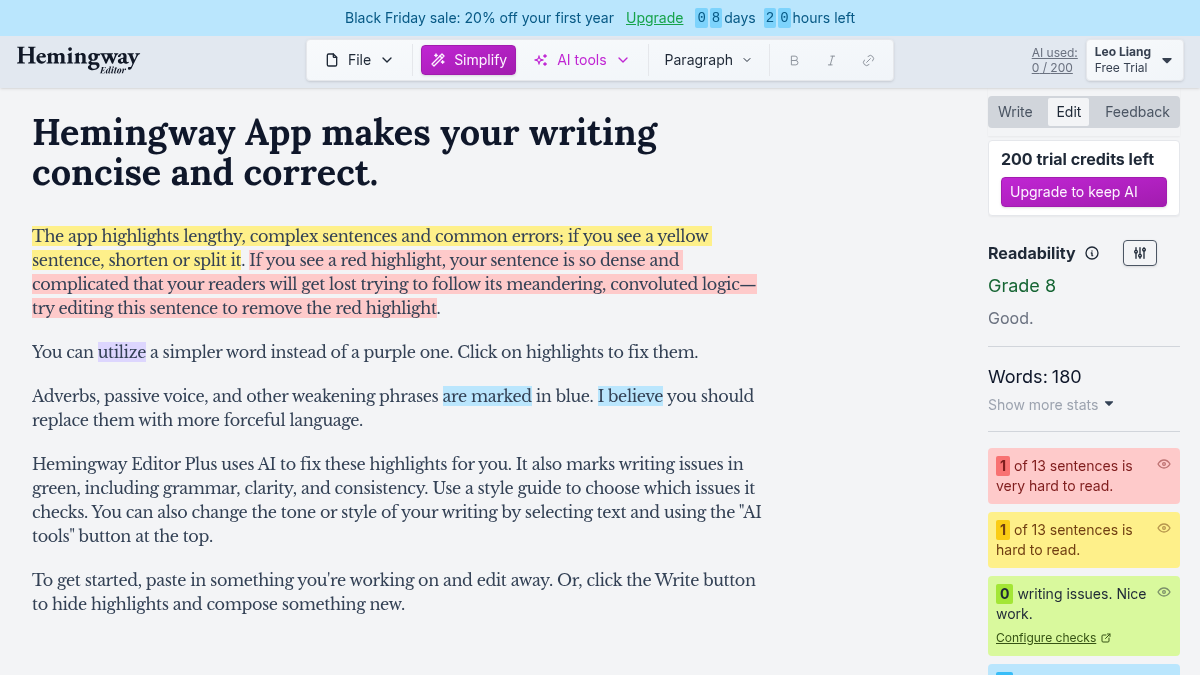
Signup took under forty seconds. Hemingway uses a magic code login sent via email (my one-time code arrived in about three seconds), requiring zero credit card upfront. Upon entering the editor, you receive a 14-day free trial loaded with 200 trial credits. The familiar layout remains largely untouched: a clean distraction-free writing pane on the left, and readability diagnostics stacked neatly along the right rail.
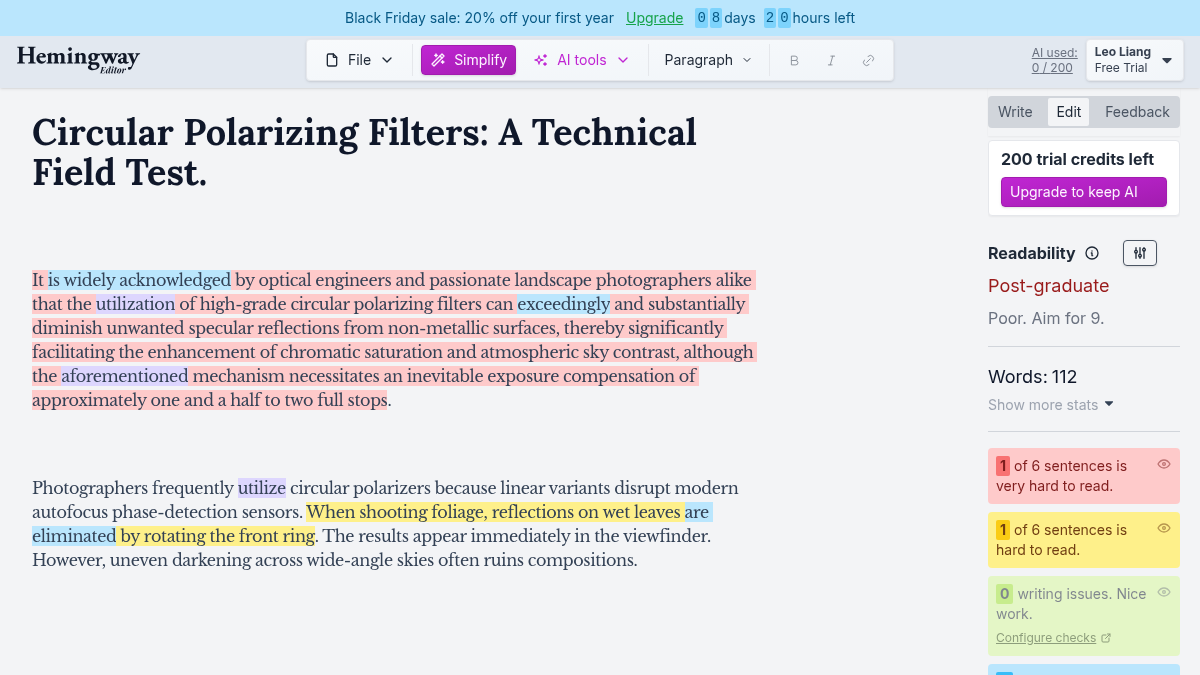
Pasting dense camera gear copy into the analyzer
To put the engine through its paces, I drafted an intentionally tortuous 112-word paragraph about camera lens circular polarizing filters, packed with passive constructions, unnecessary qualifiers, and a 48-word run-on sentence. Hemingway did not blink. The right sidebar immediately slammed my copy with a 'Post-graduate, Poor. Aim for 9' verdict. It picked up 1 very hard sentence (red), 1 hard sentence (yellow), 3 weakeners (exceedingly, substantially, significantly in blue), and 3 words with simpler alternatives (purple highlights on utilization).
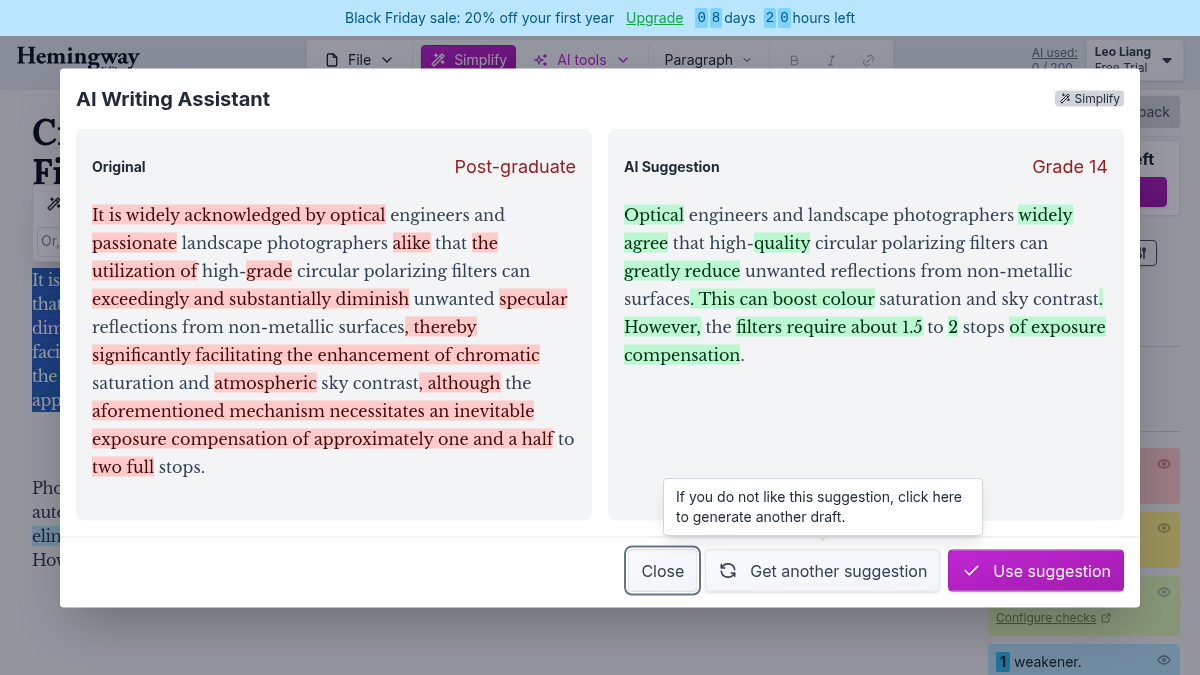
The AI rewrite in action: from 55-word run-on to three clean statements
I highlighted the 48-word monstrosity and clicked the top toolbar's 'Simplify' button. Within two seconds, an AI Writing Assistant modal popped up displaying a side-by-side Before/After diff. The original Post-graduate sentence was dismantled and reassembled into three crisp sentences: 'Optical engineers and landscape photographers widely agree that high-quality circular polarizing filters can greatly reduce unwanted reflections from non-metallic surfaces. This can boost colour saturation and sky contrast. However, the filters require about 1.5 to 2 stops of exposure compensation.' That dropped the selected segment's grade from Post-graduate straight down to Grade 14.
Clicking 'Use suggestion' immediately injected the rewritten prose into the active document. The total word count dropped from 112 to 91, all three blue weakener highlights vanished, and the overall document grade eased down to Grade 15. The AI tone felt natural rather than sanitized, preserving the technical nuance (exposure compensation, non-metallic reflections) while amputating the pretentious filler.
The sentence math: how Hemingway really meters credits
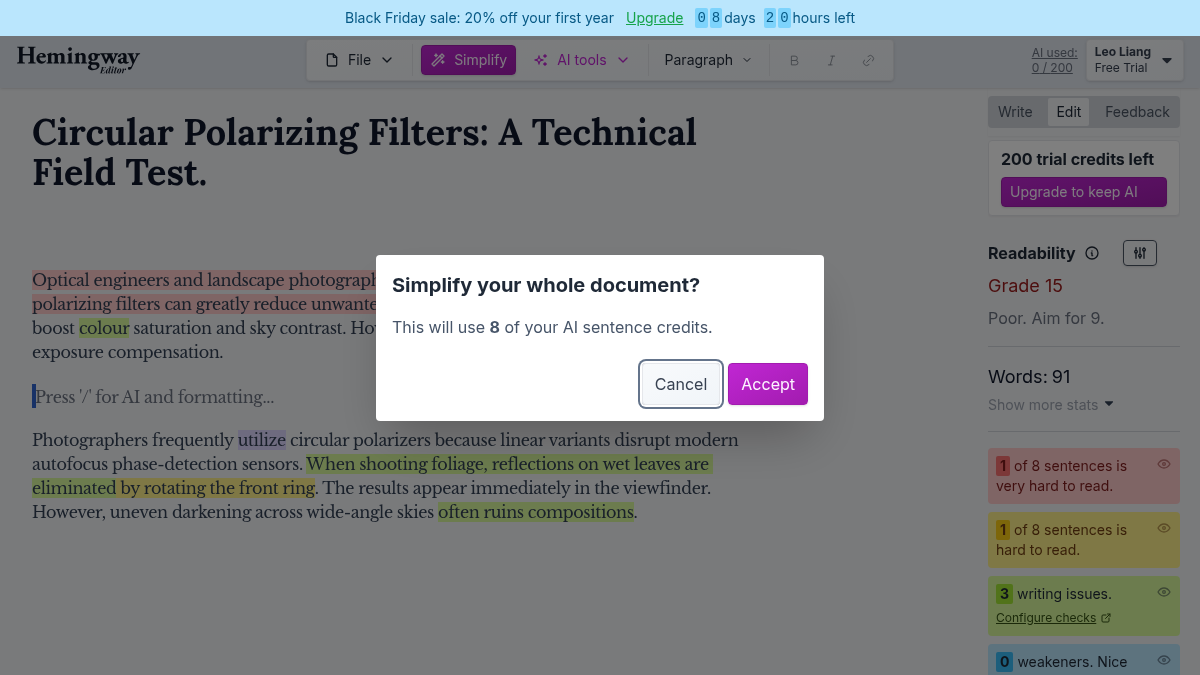
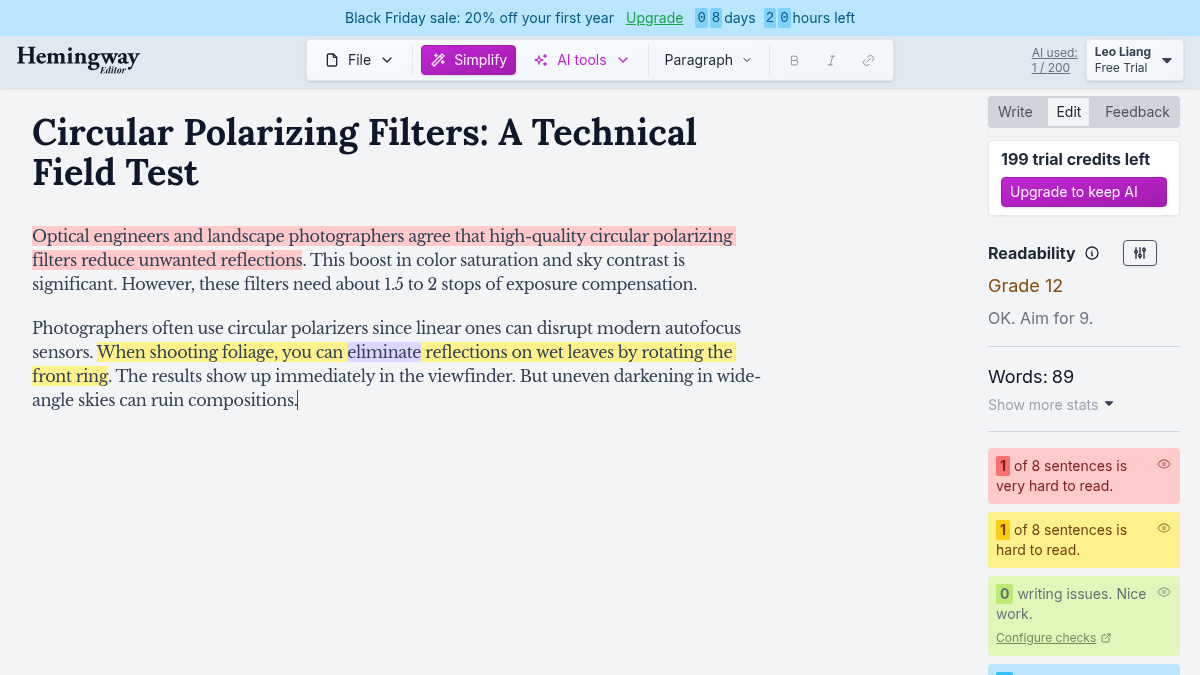
Next, I tried simplifying the rest of the document. When I triggered 'Simplify' without selecting a specific clause, Hemingway popped an unexpected confirmation modal: 'Simplify your whole document? This will use 8 of your AI sentence credits.' This clarified a critical distinction: unlike tools that meter by raw token count or word volume, Hemingway meters AI strictly by sentence count. Rewriting a whole 8-sentence passage burns exactly 8 credits.
Accepting the full-document rewrite pulled the entire text down to Grade 12 (89 words, 0 weakeners, only 1 hard sentence remaining). In the bottom right corner, the credit ticker reflected 199 credits remaining, but opening the billing dashboard revealed the underlying bookkeeping: 'AI sentences used: 9 / 200'. The trial gives you exactly 200 sentence transforms across your fourteen days.
The paywall boundaries: file export and target grades
Here is where the commercial tension surfaces. The basic browser editor—with all color highlights and reading grade scores—remains completely free. However, practical workflow essentials are gated behind Editor Plus. You cannot export or import Word docs, HTML, or Markdown on the free tier. Setting a custom target readability grade is paywalled. Even toggling dark mode requires an active subscription.
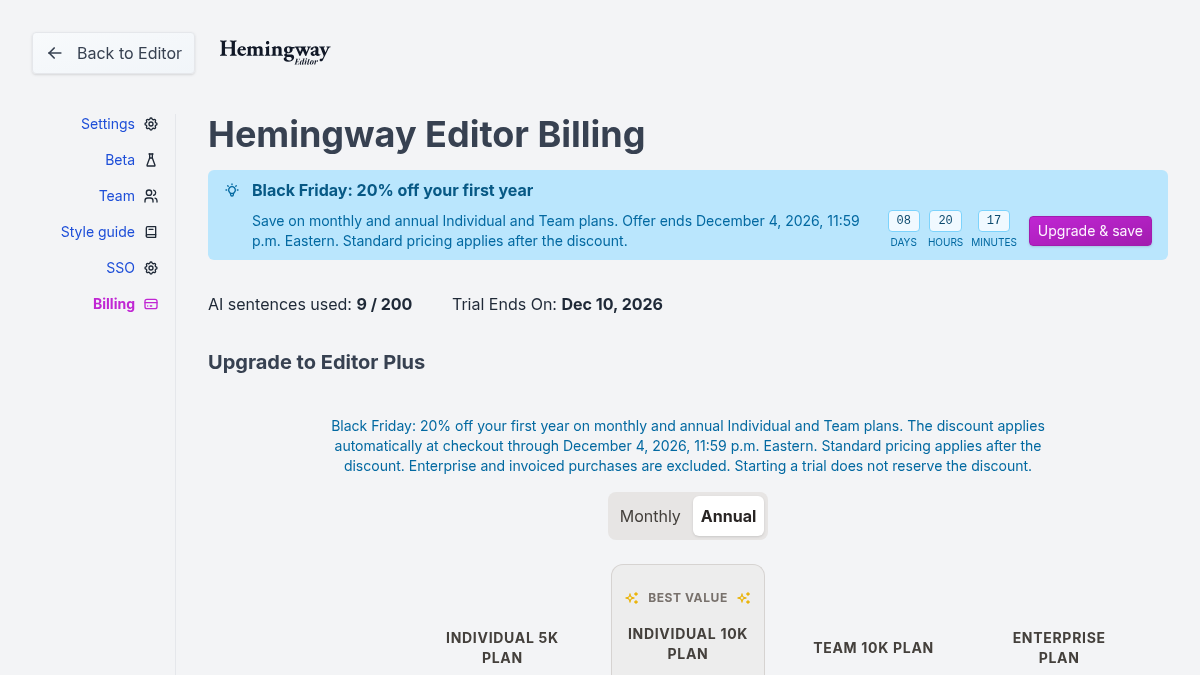
Pricing starts at Individual 5K ($10/mo monthly, or $8.33/mo billed annually at $100/yr; currently $80/yr during their Black Friday 20% promotion) for 5,000 AI sentence rewrites per month. The Individual 10K plan costs $15/mo ($12.50/mo annual, $120/yr on sale) for 10,000 AI sentences. For teams, seats run $12.50/user/month with centralized billing and up to 50 users. Advanced grammar fixes, feedback reviews, and synonym tools are unlimited across all paid tiers.
I did not test enterprise SSO, custom style-guide governance rules, or the standalone offline desktop app ($19.99 one-time). For solo creators who simply paste text into the browser, edit out the red highlights, and paste it back into Ghost or WordPress, the free tier remains one of the best bargains on the internet. But if you want one-click AI sentence surgery and clean file exports, Editor Plus earns its keep.
Final rating: 4/5. Fast, disciplined sentence surgery that respects the original voice, but file format exports and dark mode should not be held hostage behind an $8.33/month gate. I keep the listing on ToolifyNav updated if the pricing or feature gates shift.
ToolifyNav Directory
Explore Hemingway Editor on ToolifyNav
Color-coded readability editor that flags long sentences, weak words and passive voice, with optional AI rewrites in Editor Plus.
Keep Reading
Related posts
SaaS Reviews
Banani Review: A Leica-Style Lens Bench in 45 Seconds, a Surprise Pricing Pop-Up, and Paywalled Figma Exports (4/5)
Banani generated a multi-screen dark-mode camera lens filter directory in about 45 seconds, asking sharp aesthetic questions like Leica versus Peak Design before rendering. The prototype canvas is responsive and detailed, but hitting a surprise pricing modal before your first render, paywalled Figma exports, and an 80% starter quota drop keep it at 4/5.
SaaS Reviews
Vizard Review: An 8.0 Virality Score on Elephant Trunks, 720p Watermarks, and a 3-Day Clock (4/5)
I fed Vizard the historic 19-second 'Me at the zoo' clip to test its AI video clipper. It returned an accurate 9:16 vertical short in 25 seconds with an 8.0 virality rating, but the free tier comes with a 720p watermark, a WebGL requirement, and a 3-day deletion timer.
SaaS Reviews
Diffit Review: A Useful Worksheet in Seconds, but a 404 Became a Lesson (3/5)
Diffit turned my temperature notes into a correct grade-five worksheet, then rewrote it for grade two without losing the numbers. But it also invented classroom details and generated a polished lesson from a URL that returned 404, so the output needs a teacher’s source check.